
Modular Payouts SDK Integration Guide
Always-on global payouts at internet speed - end to end technical integration guide
zerohash LLC (US entity)The following steps should be followed if you're onboarding a Customer to zerohash LLC (the US entity)
This feature is available in SDK version v2.10.9 and later.
Introduction
The Payouts SDK product allows marketplaces, payment service providers, employer of record platforms, and more to offer stablecoins or crypto as a payout option.
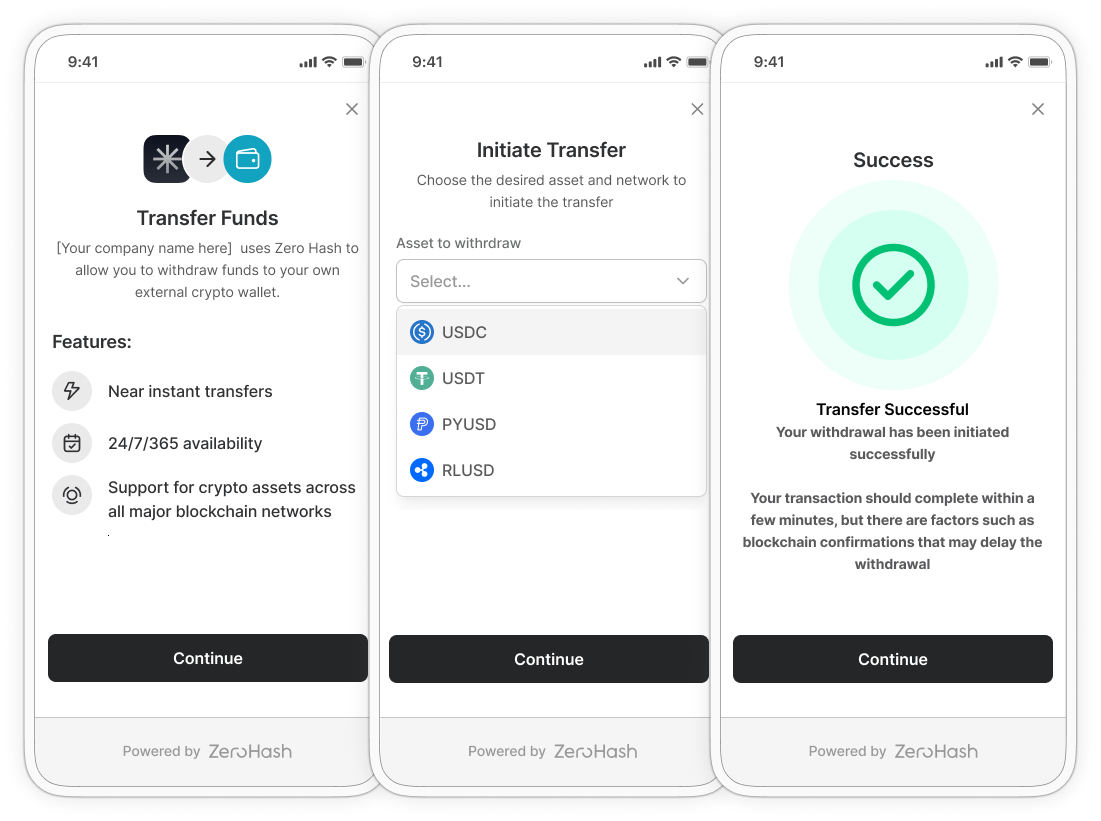
Definitions
| Term | Definition |
|---|---|
| Payout | The conversion of fiat to stablecoin and an automatic on-chain transfer to a destination address. |
| Platform | The company that's in contract with zerohash and directly interacts with zerohash's API's or SDK's. |
| Payor | An optional participant in the flow. If omitted, the Platform will take the role of the Payor. A non-natural person (typically a business) that is a customer of the Platform. This is the core front-end that the Beneficiary interacts with. |
| Beneficiary | The party that receives the stablecoin payout. |
High Level Flow
- Submit Payor
- Query Payor
- Fund Float Account
- Submit Beneficiary
- Query Beneficiary
- Connect External Account
- Initiate Payout
- Query Payouts
- Network Fee Procedures
- Email Receipt Requirements
- EOD Settlement
Initial Setup
The Platform will need to onboard its business to the zerohash platform. They then need to add additional users, create API keys, and whitelist IP addresses. See instructions here.
Platforms should be listening to the following webhooks for Modular Payouts:
1. Submit Payor
Once API keys are created and approved, the Platform can begin to integrate to the API. For the following examples, we’ll assume the Platform's platform code is PLAT01.
Payor Information
The Platform submits the Payor via POST /participants/entity/new
{
    "platform_code": "PLAT01",
    "entity_name": "Freelancer Platform XYZ",
    "legal_name": "Freelancer Platform XYZ Inc.",
    "contact_number": "15553765432",
    "website": "www.freelancerplatform.com",
    "date_established": "2018-01-15",
    "entity_type": "llc",
    "address_one": "1 Main St.",
    "address_two": "Suite 1000",
    "city": "Chicago",
    "postal_code": "12345",
    "jurisdiction_code": "US-IL",
    "tax_id": "883987654",
    "id_issuing_authority": "United States",
    "risk_rating": "low",
    "risk_vendor": "passbase",
    "sanction_screening": "pass",
    "sanction_screening_timestamp":1677252628000,
    "metadata":{},
    "signed_timestamp":1677252629000,
    "submitter_email": "[email protected]",
    "submitter_first_name": "Josh",  // new addition to these specs 11.6.24 (to be a required field in the future)
    "submitter_last_name": "Doe",  // new addition to these specs 11.6.24 (to be a required field in the future)
    "submitter_title": "Senior Legal Council", // new addition to these specs 11.6.24 (to be a required field in the future)
    "control_persons":[
      {
        "name": "Joe Doe",
        "email": "[email protected]",
        "address_one": "1 South St.",
        "address_two": "Suite 2000",
        "city": "Chicago",
        "postal_code": "12345",
        "jurisdiction_code": "US-IL",
        "date_of_birth": "1980-01-30",
        "citizenship_code": "US",
        "tax_id": "123456789",
        "id_number_type": "us_passport",
        "id_number": "332211200",
        "kyc": "pass",
        "kyc_timestamp": 1630623005000,
        "sanction_screening":"pass",
        "sanction_screening_timestamp":1677252628000,
        "control_person": 1
      }
    ],
    "beneficial_owners":[
      {
        "name": "Jane Doe Jr",
        "beneficial_owner":1,
        "email": "[email protected]",
        "address_one": "1 North St.",
        "address_two": "Suite 3000",
        "city": "Chicago",
        "postal_code": "12345",
        "jurisdiction_code": "US-IL",
        "date_of_birth": "1980-01-30",
        "citizenship_code": "US",
        "tax_id": "012345578",
        "id_number_type": "us_drivers_license",
        "id_number": "P11122243333",
        "kyc": "pass",
        "kyc_timestamp": 1630623005000,
        "sanction_screening": "pass",
        "sanction_screening_timestamp":1677252628000
      }
    ]
}
The Platform must submit at least 1 beneficial_owners and 1 control_persons. If these persons do not have an SSN, the Platform must submit a document via POST /participants/entity/documents.
You’ll receive a participant_code in the response - this is the Payor participant code that uniquely identifies the entity indefinitely. We’ll use PAYOR1 as the participant_code throughout the examples.
See response for expected shape.
Payor Documents
Your Payor will not become approved unless you also supply the proper documents via POST /participants/entity/documents endpoint. Depending on the entity_type that was used in the original POST /participants/entity/new call, the document requirements vary. See details here.
The Platform submits the Payor documents via POST /participants/entity/documents:
{
    "document": "...", // base 64 encoded file that you wish to upload (10mb limit)
    "mime": "image/png",
    "document_type": "articles_of_incorporation",
    "file_name": "test.png",
    "participant_code": "PAYOR1"
}
State Logic
After a successful POST /participants/entity/new submission, the initial status of the entity will be submitted. In order to transition this to approved, the Platform must then submit all required documents, via POST /participants/entity/documents.
2. Query Payor
Platforms can query already-submitted Payors via the GET /participants endpoint. If you'd like to query a specific Payor use theparticipant_code parameter.
3. Fund Float Account
The Platform will fund their float account by sending fiat to the proper bank account. Here are the account details:
- Participant_code: 00SCXM
- Account_group: PLAT01
- Account_label: general
- Account_type: available
- Asset: USD
In Cert, your platform will be pre-funded with Float account funds.
4. Submit Beneficiary
US Natural Person - Beneficiary
The Platform submits a Natural Person Beneficiary via POST /participants/beneficiaries/new
Available to select Platforms only: you can conditionally submit either a phone_number or an email- you must submit at least one, otherwise the request will fail.
{
    "first_name": "Lucas",
    "last_name": "Martinez",
    "email": "[email protected]",
    "address_one": "Calle San Martín 305",
    "address_two": "305",
    "city": "Buenos Aires",
    "zip": "C1000",
    "jurisdiction_code": "AR-X",
    "citizenship_code": "AR",
    "date_of_birth": "1985-09-02",
    "id_number_type": "non_us_passport",
    "id_number": "A12345678",
    "employment_status": "part_time", // optional
    "industry": "consulting", // optional
    "source_of_funds": "salary", // optional
    "signed_agreements": [
    {
        "type": "payment_services_terms",
        "region": "us",
        "signed_timestamp": 1726005278070
    }
]
}
US Non-Natural Person - Beneficiary
The Platform submits a Non-Natural Person Beneficiary via POST /participants/entity-beneficiaries/new
{
  "legal_name": "Legal Name",
  "contact_number": "+1234567890",
  "address_one": "123 Main St.",
  "city": "Chicago",
  "postal_code": "12345",
  "jurisdiction_code": "US-IL",
  "tax_id": "000-00-0000",
  "id_issuing_authority": "US",
  "address_two": "Suite 1000",
  "email": "[email protected]",
  "id_number": "549300TRWGQX5XMHYZ82"
}
See response for expected shape.
You’ll receive a participant_code in the response - this is the Beneficiary participant code that uniquely identifies the Beneficiary indefinitely. We’ll use BENEF1 as the participant_code throughout the examples.
NOTE:
- Even in Cert, zerohash will run each submitted Beneficiary through our Sanction Checks, subjecting the Beneficiaries to real validations. This means that if your entry is an actual sanctioned individual, the Beneficiary will be sent to a
rejectedstatus.- In Cert, if the Platform would like to test a rejection scenario, please submit a Beneficiary like the following, passing an
id_numberequal to111111111 - In Cert, if the Platform would like to test a rejection scenario, please submit a Beneficiary like the following, passing an
first_nameequal toJosephandlast_nameequal toKony
- In Cert, if the Platform would like to test a rejection scenario, please submit a Beneficiary like the following, passing an
- zerohash requires that the
jurisdiction_codeis not null and contains both a Country (ie, Brazil "BR") and a Subdivision (ie, Sao Palo "SP") to form BR-SP, for example. If your systems don't contain the subdivision and you only collect Country and Postal Code, we recommend performing a mapping on your side to derive the correct Subdivision, using the Country and Postal code as inputs. See this step-by-step guide on how to use an external API (ie, Google Geocoding API) to make a conversion between your data structure, to ours. - The API will allow for either a
tax_idor (id_numberandid_number_type). So, US persons with an SSN for example, can submit their SSN without additionally needing to undergo ID verification. - Platforms can query already-submitted Beneficiaries via the GET /participants endpoint.
- You should expect that Beneficiaries transition from
submittedtoapproved,rejected,pending_approval.
Beneficiary State Logic
After a successful POST /participants/beneficiaries/new submission, the initial status of the Beneficiary will be submitted. At this point, zerohash is running an automated compliance screening. If the person passes this check, the status will transition to an approved state. If the compliance screening results in a hit, the status will transition to a pending_approval status. Note: there is also a scenario where the Beneficiary transitions directly into a rejected state, depending on the compliance score. zerohash’s compliance team will become alerted and will manually review the Beneficiary within 24 hours. If the determination after that review is that the Beneficiary should not have been flagged, the status will transition to approved. Otherwise, the status will transition to rejected.
5. Query Beneficiary
Platforms can query already-submitted Beneficiaries via the GET /participants endpoint. A common query parameter is the participant_code, however the full list can be found on the API reference.
See response for expected shape.
6. Connect External Account
This is the first step where the Platform will invoke an SDK UI
6a. Account Link SDK - Request Access Token
The Platform should request a client access token specifying:
| Field | Description | Example Value | Required? |
|---|---|---|---|
participant_code | The 6-digit alpha numeric code associated with the Beneficiary that is looking to withdraw (the response of the original POST /participants/customers/new call) | BENEF1 | Y |
permissions | The array of permissions that will be granted to the returned JWT token | ["crypto-account-link"] | Y |
Example POST /client_auth_token request:
 {
    "participant_code": "BENEF1",
    "permissions": ["crypto-account-link"]
}
After a successful POST /client_auth_token call, the next step is to start the Account Link SDK flow, see the example below for doing it in a React application. Keep in mind that if you're using a Native Mobile App (Swift, Flutter, etc) instead of using zh-web-sdk you should follow the WebView approach, described here
import React from 'react';
import ZeroHashSDK, { AppIdentifier } from 'zh-web-sdk';

const App = () => {
  const sdk = new ZeroHashSDK({
    zeroHashAppsURL: "https://web-sdk.cert.zerohash.com",
    cryptoAccountLinkPayoutsJWT: "<JWT_TOKEN_HERE>"
  });

    sdk.openModal({
    appIdentifier: AppIdentifier.CRYPTO_ACCOUNT_LINK_PAYOUTS,
  })
  return <></>;
}

export default App;
6b. Account Link SDK - Link Account
At this point, the Beneficiary is interacting with the front end SDK. The Beneficiary will ultimately link their account.
Once the Beneficiary successfully creates an Account we'll send a postMessage event with type CRYPTO_ACCOUNT_LINK_EXTERNAL_ACCOUNT_CREATED. The purpose of this event is to inform the Platform's Front end that the Beneficiary's external_account was created and the Platform's FE can fetch that information from the GET /payments/external_accounts endpoint. Usually this will happen with the purpose of displaying these accounts on the screen for the Beneficiary to choose from
Here is an example of how a React application could consume the CRYPTO_ACCOUNT_LINK_EXTERNAL_ACCOUNT_CREATED postMessage event:
 useEffect(() => {
    window.addEventListener('message', message => {
      if (message.data.type === 'CRYPTO_ACCOUNT_LINK_EXTERNAL_ACCOUNT_CREATED') {
        // A new external account for the end-user  was created, do stuff here
      }
    })
    return () => {
      window.removeEventListener('message', () => {})
    }
  }, [])
Once the account is successfully linked a Webhook Event will be sent, see more details on Section 6c
6c. Account Link SDK - Consume External Account Webhooks
NOTE: Your Platform must be configured with a valid webhook URL in order to receive these webhooks. Please get in touch with a zerohash representative so that they can set this up for you. Also, your Platform will need to be specifically enabled to receive these webhooks (the zerohash rep will also make this configuration).
After the Beneficiary successfully links an account on the SDK front end, the Platform can consume the external account webhook events.
Note: the x-zh-hook-payload-type is external_account_status_changed (more details on webhooks here)
Payload fields:
- Always: participant_code, account_nickname, external_account_id, external_account_status, timestamp.
- Sometimes: account_type, status_reason, reference_id. The pending payload omits account_type.
| Scenario | Webhook |
|---|---|
| Account created. Every account passes through this. | External Account Webhook with external_account_status = pending |
| Crypto account passes address screening | External Account Webhook with external_account_status = approved |
| Crypto address is malformed, on the deny list, or fails validation definitively | External Account Webhook with external_account_status = rejected and status_reason = invalid or denied destination address |
| Crypto address is sanctioned | External Account Webhook with external_account_status = rejected and status_reason = sanctioned address |
| Address screening still unavailable after the final retry attempt | External Account Webhook with external_account_status = rejected and status_reason = unable to validate external account |
| Account isn’t a crypto account | External Account Webhook with external_account_status = rejected and status_reason = account not crypto |
| Asset or network isn’t supported | External Account Webhook with external_account_status = rejected and status_reason = <value> is not supported |
| Account closed by the platform or the end customer | External Account Webhook with external_account_status = closed |
| Account locked, zerohash risk and compliance team was alerted to suspicious activity and locked the account for further investigation. | External Account Webhook with external_account_status = locked |
| Account disabled, zerohash risk and compliance team investigations resulted in a positive hit of suspicious activity and the team determined that the account can no longer be used. | External Account Webhook with external_account_status = disabled |
6d Account Link SDK - Query External Accounts
The Platform can also query the GET /payments/external_accounts to view information about the linked account. Example response:
 {
      "external_account_id": "2cc93b20-ee43-4877-8cdc-863e61829015",
      "account_nickname": "",
      "participant_code": "BENEF1",
      "platform_code": "PLAT01",
      "type": "crypto",
      "details": {
        "network": "SOL",
        "supported_assets": ["USDC"],
        "address": "EPjFWdd5AufqSSqeM2qN1xzybapC8G4wEGGkZwyTDt1v"
      },
      "created_at": "2024-08-15T22:39:24.171Z",
      "updated_at": "2024-08-15T22:39:24.171Z",
      "status_reason": "",
      "external_account_status": "pending"
    }
7. Initiate Payout
7a. Payouts SDK - Request Access Token
Now that the external account has been created, the Platform can use the Crypto Withdraw SDK. The next step is to request a client access token specifying:
| Field | Description | Example Value | Required? |
|---|---|---|---|
participant_code | The 6-digit alpha numeric code associated with the Beneficiary | BENEF1 | Y |
permissions | The array of permissions that will be granted to the returned JWT token | ["crypto-payouts"] | Y |
external_account_id | The UUID associated with the external account | 0f68333e-2114-469d-b505-c850d776e063 | Y |
quoted_asset | The fiat currency being used to fund the trade | USD | Y |
withdrawal_request_amount | The amount, in quoted_asset terms, to be withdrawn | 200 | Y |
reference_id | Platform reference id for a specific transaction | 0bd7f7f0-cf26-495f-b2df-e8afe8481ba3 | N |
Example POST /client_auth_token request:
 {
    "participant_code": "BENEF1",
    "permissions": ["crypto-payouts"],
    "withdrawal_details": {
        "external_account_id": "c476a81f-a29f-4e22-88db-1f521d7cf004",
        "quoted_asset": "USD",
        "withdrawal_request_amount": "200"
    },
   "reference_id": "0bd7f7f0-cf26-495f-b2df-e8afe8481ba3"
}
Starting the Withdrawal flow
After a successful POST /client_auth_token call, the next step is to start the Withdrawal SDK flow, see the example below for doing it in a React application. Keep in mind that if you're using a Native Mobile App (Swift, Flutter, etc) instead of using zh-web-sdk you should follow the WebView approach, described here
You can see the full integration guide for Withdrawals on the link belowhttps://docs.zerohash.com/reference/sdk-modules-crypto-withdrawals
import React from 'react';
import ZeroHashSDK, { AppIdentifier } from 'zh-web-sdk';

const App = () => {
  const sdk = new ZeroHashSDK({
    zeroHashAppsURL: "https://web-sdk.cert.zerohash.com",
    payoutsJWT: "<JWT_TOKEN_HERE>"
  });

    sdk.openModal({
    appIdentifier: AppIdentifier.PAYOUTS,
  })
  return <></>;
}

export default App;
The Beneficiary will be shown the Withdrawal screen with a pre-populated withdrawal request, highlighting the following data points:
| Data Point | Description | Example |
|---|---|---|
| Transfer Request Amount | The amount of quoted_asset they want to transfer | 200 |
| Destination Wallet | The wallet nickname and address of where the Payout is going to | John's USDC on Ethereum Wallet (**cB89) |
| Withdrawal Fee | The transaction fee being assessed on the withdrawal | 1.50 |
| Network Fee | The blockchain-assessed network fee on the withdrawal, in quoted_asset terms | 1.25 |
| Withdrawal Receive Amount | The amount of the stablecoin or crypto asset that the user will be receiving | 197.25 |
7b. Payouts SDK - Initiate Payout
At this point, the Beneficiary is interacting with the front end SDK. The Beneficiary will ultimately initiate the Payout.
7c. Payouts SDK - Consume Payments Webhook
NOTE: Your Platform must be configured with a valid webhook URL in order to receive these webhooks. Please get in touch with a zerohash representative so that they can set this up for you. Also, your Platform will need to be specifically enabled to receive these webhooks (the zerohash rep will also make this configuration).
After the Beneficiary successfully initiates the payout via the SDK, the Platform should be prepared to consume the payments webhook events
Note: the x-zh-hook-payload-type is payment_status_changed (more details on webhooks here)
Status Summary
The Payout will initially enter a status of submitted. From here, it's possible (yet rare) that zerohash has issues internally processing the transaction. If this happens, it will enter a terminal status of failed. When the transaction has been successfully broadcasted on-chain, it will enter a status of posted. A terminal status of settled is reached when the Withdrawal has been confirmed on-chain and received by the Beneficiary.
| Condition | Outcome | Webhook |
|---|---|---|
| Payout request accepted | Payment is created and queued for processing. | Payments Status Update webhook with status = submitted |
| Processing starts | Payment moves to pending while destination screening, the asset check and the quote run. | Payments Status Update webhook with status = pending |
| Full processing succeeds | The payment is created and sent to the network. | Payments Status Update webhook with status = posted |
| Initial processing succeeds and payout is high value ($1M+) | The payment is accepted waits for the first on-chain event. | Payments Status Update webhook with status = processing. Then status = posted on the first on-chain event |
| Withdrawal confirmed on-chain | Payment is complete. | Payments Status Update webhook with status = settled |
| Destination address is rejected by pre-trade screening | The payment fails and nothing is sent. | Payments Status Update webhook with status = failed, failure_reason = destination address failed compliance screening |
| Asset is depegged | The payment fails and nothing is sent. | Payments Status Update webhook with status = failed, failure_reason = asset is currently depegged and conversions are halted |
| The vault rejects the withdrawal after submission | The payment fails. A payment already settled ignores the rejection. | Payments Status Update webhook with status = failed, failure_reason = withdrawal rejected |
7d. Payouts SDK - Query Payments
The Platform can also query the GET /payments to view information about the Payout. Example response:
{
    "request_id": "a502a26d-3734-497e-826b-d8d5734221e7",
    "participant_code": "BENEF1",
    "platform_code": "PLAT01",
    "obo_participant": {
        "participant_code": "PAYOR1",
        "account_group": "PLAT01",
        "account_label": "general"
    },
    "payment_id": "0f68333e-2114-469d-b505-c850d776e061",
    "asset": "USDC",
    "network": "ETH",
    "quoted_asset": "USD",
    "status": "submitted",
    "external_account_id": "c476a81f-a29f-4e22-88db-1f521d7cf004",
    "created_at": "2024-11-15T23:02:06.836Z",
    "total": "200",
    "reference_id": "0bd7f7f0-cf26-495f-b2df-e8afe8481ba3"
}
8. Complete End of Day (EOD) Settlement
After each session, the Platform will be required to top up their float account to its original level. This is referred to as a Net Delivery Obligation (NDO). First, here are the standard settlement session and its schedules:
| Session | NDO Wire Due |
|---|---|
| Monday | By Tuesday EOD |
| Tuesday | By Wednesday EOD |
| Wednesday | By Thursday EOD |
| Thursday | By Friday EOD |
| Friday | By Monday EOD |
For Bank Holidays in the US, the NDO will be due during the next valid business day.
9. Network Fee Procedure
The Platform will be paying for the network fee associated with any Payouts. There are 2 options:
- Fund the network fee account. Account details:
- Participant_code: PLAT01 (the Platform's participant_code)
- Account_group: PLAT01
- Account_label: network_fee
- Asset: USD
All network fees will paid out of this account in real-time
- Don’t fund the network fee account. This account will build up a payable balance
zerohash will add the amount of the receivable balance on this account to the end of month invoice, coupling it with the Payout usage activity amount due.
10. Email Receipt Requirements
zerohash requires that the Payor receives an email receipt for each Payout. We also insist that the email contain
- Certain fields and values, which can be obtained using our API
- Adequate support contact information
Fields
Here are the required field names and their associated API fields:
| Email Receipt Field Name | Description | Example | API Location |
|---|---|---|---|
| Order Number | Unique order identifier | 9a738372-0855-4b25-8c65-5de0aa858b8b | payment_id from GET /payments or POST /payments response |
| Order Type | The type of order | Payout Transmission (must present this value verbatim) | N/a, can hard-code to "Payout Transmission" |
| Transmission Amount | The transmission amount for the Payout, in quoted currency terms | $10 | total GET /payments or POST /payments response |
| Amount Received by Beneficiary | The amount of the underlying Payout received by the Beneficiary | 10 USDC | total GET /payments or POST /payments response |
| Fees | Any added fee values included in the Payout. If there are no fees, then this needs to be expressly stated. This includes processing fees (ie, a fee assessed by the Platform to the Payor) or blockchain network fees. | "$0", "1.99", "$0 Fees", or "No Fees" | - Payouts does not currently support processing fees - If the Payor is incurring the network fee, take |
| Date/Time | Date and timestamp of the Payout's transmission (meaning the time that the fiat was converted and settled into USDC within the zerohash system) | 2024-10-11 18:38:00 | created_at from GET /payments or POST /payments response |
| Account ID | zerohash’s unique account identifier for the Payor ( the “participant code” within zerohash). | BENEF1 | participant_code from GET /payments or POST /payments response |
Support Information
| Field | Value (examples) |
|---|---|
| Platform Contact Email | [email protected] |
| Platform Phone | (123) 123-1234 |
| Platform Address | 123 Main Street New York, NY 10014 |
| Platform Support Contact Email (if different from above) | [email protected] - this is an email that is used to contact zerohash directly |
| zerohash Contact Information | Zero Hash LLC (NMLS ID 1699379) This value should be included in the email verbatim |
zerohash B.V. (EU entity)The following steps should be followed if you're onboarding a Customer to zerohash B.V. (the EU entity)
This feature is available in SDK version v2.10.9 and later.
Introduction
The Payouts SDK product allows marketplaces, payment service providers, employer of record platforms, and more to offer stablecoins or crypto as a payout option.
Definitions
| Term | Definition |
|---|---|
| Payout | The conversion of fiat to stablecoin and an automatic on-chain transfer to a destination address. |
| Platform | The company that's in contract with zerohash and directly interacts with zerohash's API's or SDK's. |
| Payor | An optional participant in the flow. If omitted, the Platform will take the role of the Payor. A non-natural person (typically a business) that is a customer of the Platform. This is the core front-end that the Beneficiary interacts with. |
| Beneficiary | The party that receives the stablecoin payout. |
High Level Flow
- Submit Payor
- Query Payor
- Fund Float Account
- Submit Beneficiary
- Query Beneficiary
- Connect External Account
- Initiate Payout
- Query Payouts
- Network Fee Procedures
- Email Receipt Requirements
- EOD Settlement
Initial Setup
The Platform will need to onboard its business to the zerohash platform. They then need to add additional users, create API keys, and whitelist IP addresses. See instructions here.
Platforms should be listening to the following webhooks for Modular Payouts:
1. Submit Payor
Once API keys are created and approved, the Platform can begin to integrate to the API. For the following examples, we’ll assume the Platform's platform code is PLAT01.
EU Payor Information
The Platform submits the Payor via POST /participants/entity/new
{
  "request_id": "b2c3d4e5-6789-01bc-defg-234567890bcd",
  "platform_code": "PLAT01",
  "entity_name": "Entity B",
  "legal_name": "Entity B B.V.",
  "contact_number": "31201234567",
  "website": "https://entityb.eu",
  "date_established": "2018-03-10",
  "entity_type": "llc",
  "address_one": "Herengracht 100",
  "address_two": "",
  "city": "Amsterdam",
  "postal_code": "1015 BS",
  "jurisdiction_code": "NL",
  "tax_id": "NL861821195B01",
  "id_issuing_authority": "Netherlands",
  "risk_rating": "low",
  "sanction_screening": "pass",
  "sanction_screening_timestamp": 1603378501286,
  "signed_timestamp": 1603378501286,
  "submitter_email": "[email protected]",
  "submitter_first_name": "Anna",
  "submitter_last_name": "de Vries",
  "submitter_title": "Compliance Officer",
  "id_number_type": "legal_entity_identifier",
  "id_number": "724500XVX2LKTAJ2ML85",
  "chamber_of_commerce_number": "34123456",
  "reason_for_business_relationship": "Provision of digital asset custody and settlement services to entity clients",
  "expected_annual_volume": "over_500k",
  "activity_locations": ["NL", "DE", "FR"],
  "entity_source_of_funds": "operating_revenues",
  "entity_source_of_funds_description": "Revenue from proprietary trading algorithms",
  "no_persons_with_effective_control_declaration": false,
  "declaration_no_foreseeable_ownership_changes": true,
  "board_members": [
    {
      "first_name": "Johan",
      "last_name": "Bakker",
      "email": "[email protected]",
      "address_one": "Herengracht 100",
      "city": "Amsterdam",
      "postal_code": "1015 BS",
      "jurisdiction_code": "NL",
      "citizenship_code": "NL",
      "date_of_birth": "1975-04-22",
      "place_of_birth": "Rotterdam, Netherlands",
      "place_of_birth_country_code": "NL",
      "id_number_type": "passport",
      "id_number": "NL1234567",
      "id_issuing_authority": "Netherlands",
      "sanction_screening": "pass",
      "sanction_screening_timestamp": 1603378501286
    }
  ],
  "control_persons": [
    {
      "name": "Johan Bakker",
      "first_name": "Johan",
      "last_name": "Bakker",
      "email": "[email protected]",
      "address_one": "Herengracht 100",
      "city": "Amsterdam",
      "postal_code": "1015 BS",
      "jurisdiction_code": "NL",
      "citizenship_code": "NL",
      "country_of_birth": "NL",
      "place_of_birth_country_code": "NL",
      "date_of_birth": "1975-04-22",
      "id_number_type": "passport",
      "id_number": "NL1234567",
      "id_issuing_authority": "Netherlands",
      "role": "Managing Director",
      "ownership_percentage": 0,
      "sanction_screening": "pass",
      "sanction_screening_timestamp": 1603378501286,
      "control_person": 1,
      "kyc": "pass",
      "kyc_timestamp": 1603378501286
    }
  ],
  "beneficial_owners": [
    {
      "name": "Maria Jansen",
      "first_name": "Maria",
      "middle_name": "Elisabeth",
      "last_name": "Jansen",
      "email": "[email protected]",
      "phone_number": "31612345678",
      "address_one": "Keizersgracht 200",
      "city": "Amsterdam",
      "postal_code": "1016 DW",
      "jurisdiction_code": "NL",
      "country_of_birth": "NL",
      "place_of_birth_country_code": "NL",
      "citizenship_code": "NL",
      "date_of_birth": "1980-11-02",
      "tax_id": "123456789",
      "id_number_type": "legal_entity_identifier",
      "id_number": "123456789",
      "id_issuing_authority": "Netherlands",
      "ownership_percentage": 30,
      "beneficial_owner": 1,
      "sanction_screening": "pass",
      "sanction_screening_timestamp": 1603378501286,
      "kyc": "pass",
      "kyc_timestamp": 1603378501286
    }
  ],
  "signed_agreements": [
    {
      "type": "fund_auto_convert",
      "region": "eu",
      "signed_timestamp": 1603378501286
    }
  ]
}
You’ll receive a participant_code in the response - this is the Payor participant code that uniquely identifies the entity indefinitely. We’ll use PAYOR1 as the participant_code throughout the examples.
See response for expected shape.
Payor Documents
Your Payor will not become approved unless you also supply the proper documents via POST /participants/entity/documents endpoint. Depending on the entity_type that was used in the original POST /participants/entity/new call, the document requirements vary. See details here.
The Platform submits the Payor documents via POST /participants/entity/documents:
{
    "document": "...", // base 64 encoded file that you wish to upload (10mb limit)
    "mime": "image/png",
    "document_type": "articles_of_incorporation",
    "file_name": "test.png",
    "participant_code": "PAYOR1"
}
State Logic
After a successful POST /participants/entity/new submission, the initial status of the entity will be submitted. In order to transition this to approved, the Platform must then submit all required documents, via POST /participants/entity/documents.
2. Query Payor
Platforms can query already-submitted Payors via the GET /participants endpoint. If you'd like to query a specific Payor use theparticipant_code parameter.
3. Fund Float Account
The Platform will fund their float account by sending fiat to the proper bank account. Here are the account details:
- Participant_code: ZHDSEU
- Account_group: PLAT01
- Account_label: general
- Account_type: available
- Asset: USD
In Cert, your platform will be pre-funded with Float account funds.
4. Submit Beneficiary
EU Natural Person - Beneficiary
The Platform submits a Natural Person Beneficiary via POST /participants/beneficiaries/new
{
    "onboarding_profile": "payouts_beneficiary",
    "first_name": "Lucas",
    "last_name": "Martinez",
    "email": "[email protected]", //optional, email or phone number
    "phone_number": "31612345678", //optional, email or phone number
    "address_one": "Herengracht 100",
    "address_two": "2",
    "city": "Amsterdam",
    "postal_code": "1015 BS",
    "jurisdiction_code": "NL-NH",
    "citizenship_code": "NL",
    "date_of_birth": "1985-09-02",
    "id_number_type": "non_us_passport",
    "id_number": "NL1234567",
    "id_issuing_authority": "Netherlands",
    "employment_status": "part_time", // optional
    "industry": "consulting", // optional
    "source_of_funds": "salary" // optional
}
EU Non-Natural Person - Beneficiary
The Platform submits a Non-Natural Person Beneficiary via POST /participants/entity-beneficiaries/new
{
  "legal_name": "Acme Supplies B.V.",
  "dba_name": "Acme Supplies",
  "address_one": "1 Example Street",
  "city": "Amsterdam",
  "postal_code": "1011AB",
  "jurisdiction_code": "NL-NH",
  "id_issuing_authority": "Netherlands",
  "email": "[email protected]", //optional, email or phone number
  "contact_number": "+31201234567", //optional, email or phone number
  "legal_entity_identifier": "5493001KJTIIGC8Y1R12", //optional, LEI or CRN or TIN
  "company_registration_number": "12345678", //optional, LEI or CRN or TIN
  "tax_id": "12345678", //optional, LEI or CRN or TIN
  "incorporation_address": { "jurisdiction_code": "NL-NH" },
  "date_established": "2015-04-01"
}
See response for expected shape.
You’ll receive a participant_code in the response - this is the Beneficiary participant code that uniquely identifies the non-natural person indefinitely. We’ll use BENEF1 as the participant_code throughout the examples.
NOTE:
- Even in Cert, zerohash will run each submitted Beneficiary through our Sanction Checks, subjecting the Beneficiaries to real validations. This means that if your entry is an actual sanctioned individual, the Beneficiary will be sent to a
rejectedstatus. - zerohash requires that the
jurisdiction_codeis not null and contains both a Country (ie, Brazil "BR") and a Subdivision (ie, Sao Palo "SP") to form BR-SP, for example. If your systems don't contain the subdivision and you only collect Country and Postal Code, we recommend performing a mapping on your side to derive the correct Subdivision, using the Country and Postal code as inputs. See this step-by-step guide on how to use an external API (ie, Google Geocoding API) to make a conversion between your data structure, to ours. - Platforms can query already-submitted Beneficiaries via the GET /participants endpoint.
You should expect that Beneficiaries transition from submitted to approved, rejected, pending_approval .
Beneficiary State Logic
After a successful POST /participants/beneficiaries/new submission, the initial status of the Beneficiary will be submitted. At this point, zerohash is running an automated compliance screening. If the person passes this check, the status will transition to an approved state. If the compliance screening results in a hit, the status will transition to a pending_approval status. Note: there is also a scenario where the Beneficiary transitions directly into a rejected state, depending on the compliance score. zerohash’s compliance team will become alerted and will manually review the Beneficiary within 24 hours. If the determination after that review is that the Beneficiary should not have been flagged, the status will transition to approved. Otherwise, the status will transition to rejected.
5. Query Beneficiary
Platforms can query already-submitted Beneficiaries via the GET /participants endpoint. A common query parameter is the participant_code, however the full list can be found on the API reference.
See response for expected shape.
6. Connect External Account
This is the first step where the Platform will invoke an SDK UI
6a. Account Link SDK - Request Access Token
The Platform should request a client access token specifying:
| Field | Description | Example Value | Required? |
|---|---|---|---|
participant_code | The 6-digit alpha numeric code associated with the Beneficiary | BENEF1 | Y |
permissions | The array of permissions that will be granted to the returned JWT token | ["crypto-account-link"] | Y |
Example POST /client_auth_token request:
 {
    "participant_code": "BENEF1",
    "permissions": ["crypto-account-link"]
}
After a successful POST /client_auth_token call, the next step is to start the Account Link SDK flow, see the example below for doing it in a React application. Keep in mind that if you're using a Native Mobile App (Swift, Flutter, etc) instead of using zh-web-sdk you should follow the WebView approach, described here
import React from 'react';
import ZeroHashSDK, { AppIdentifier } from 'zh-web-sdk';

const App = () => {
  const sdk = new ZeroHashSDK({
    zeroHashAppsURL: "https://web-sdk.cert.zerohash.eu",
    cryptoAccountLinkPayoutsJWT: "<JWT_TOKEN_HERE>"
  });

    sdk.openModal({
    appIdentifier: AppIdentifier.CRYPTO_ACCOUNT_LINK_PAYOUTS,
  })
  return <></>;
}

export default App;
6b. Account Link SDK - Link Account
At this point, the Beneficiary is interacting with the front end SDK. The Beneficiary will ultimately link their account and provide Travel Rule information for the wallet address.
At this time, the Account Link SDK supports linking:
- Self-custody wallets, for amounts up to €1,000 every 12 hours to that address
- Exchange wallets
To send payouts above the €1,000 per 12 hours threshold to a self-custody wallet, the Platform must first submit proof of ownership for that wallet using POST /travel-rule/submit. You will not be able to invoke the Payouts SDK for a payout exceeding that threshold without completing this step.
Once the Beneficiary successfully creates an Account we'll send a postMessage event with type CRYPTO_ACCOUNT_LINK_EXTERNAL_ACCOUNT_CREATED. The purpose of this event is to inform the Platform's Front end that the Beneficiary's external_account was created and the Platform's FE can fetch that information from the GET /payments/external_accounts endpoint. Usually this will happen with the purpose of displaying these accounts on the screen for the Beneficiary to choose from
Here is an example of how a React application could consume the CRYPTO_ACCOUNT_LINK_EXTERNAL_ACCOUNT_CREATED postMessage event:
 useEffect(() => {
    window.addEventListener('message', message => {
      if (message.data.type === 'CRYPTO_ACCOUNT_LINK_EXTERNAL_ACCOUNT_CREATED') {
        // A new external account for the end-user  was created, do stuff here
      }
    })
    return () => {
      window.removeEventListener('message', () => {})
    }
  }, [])
Once the account is successfully linked a Webhook Event will be sent, see more details on Section 6c
6c. Account Link SDK - Consume External Account Webhooks
NOTE: Your Platform must be configured with a valid webhook URL in order to receive these webhooks. Please get in touch with a zerohash representative so that they can set this up for you. Also, your Platform will need to be specifically enabled to receive these webhooks (the zerohash rep will also make this configuration).
After the Beneficiary successfully links an account on the SDK front end, the Platform can consume the external account webhook events.
Note: the x-zh-hook-payload-type is external_account_status_changed (more details on webhooks here)
Payload fields:
- Always: participant_code, account_nickname, external_account_id, external_account_status, timestamp.
- Sometimes: account_type, status_reason, reference_id. The pending payload omits account_type.
| Scenario | Webhook |
|---|---|
| Account created. Every account passes through this. | External Account Webhook with external_account_status = pending |
| Crypto account passes address screening | External Account Webhook with external_account_status = approved |
| Crypto address is malformed, on the deny list, or fails validation definitively | External Account Webhook with external_account_status = rejected and status_reason = invalid or denied destination address |
| Crypto address is sanctioned | External Account Webhook with external_account_status = rejected and status_reason = sanctioned address |
| Address screening still unavailable after the final retry attempt | External Account Webhook with external_account_status = rejected and status_reason = unable to validate external account |
| Account isn’t a crypto account | External Account Webhook with external_account_status = rejected and status_reason = account not crypto |
| Asset or network isn’t supported | External Account Webhook with external_account_status = rejected and status_reason = <value> is not supported |
| Account closed by the platform or the end customer | External Account Webhook with external_account_status = closed |
| Account locked, zerohash risk and compliance team was alerted to suspicious activity and locked the account for further investigation. | External Account Webhook with external_account_status = locked |
| Account disabled, zerohash risk and compliance team investigations resulted in a positive hit of suspicious activity and the team determined that the account can no longer be used. | External Account Webhook with external_account_status = disabled |
6d Account Link SDK - Query External Accounts
The Platform can also query the GET /payments/external_accounts to view information about the linked account. Example response:
 {
      "external_account_id": "2cc93b20-ee43-4877-8cdc-863e61829015",
      "account_nickname": "",
      "participant_code": "BENEF1",
      "platform_code": "PLAT01",
      "type": "crypto",
      "details": {
        "network": "SOL",
        "supported_assets": ["USDC"],
        "address": "EPjFWdd5AufqSSqeM2qN1xzybapC8G4wEGGkZwyTDt1v"
      },
      "created_at": "2024-08-15T22:39:24.171Z",
      "updated_at": "2024-08-15T22:39:24.171Z",
      "status_reason": "",
      "external_account_status": "pending"
    }
7. Initiate Payout
EUR quoted currencyFor zerohash B.V. (EU), you can quote in USD or EUR. The examples on this page use USD. To use EUR, replace the quoted currency and amounts with their EUR equivalents. EUR pairs are available for a growing set of assets. Visit Supported Instruments (RFQ) to see which assets can be quoted in EUR.
7a. Payouts SDK - Request Access Token
Now that the external account has been created, the Platform can use the Crypto Withdraw SDK. The next step is to request a client access token specifying:
| Field | Description | Example Value | Required? |
|---|---|---|---|
participant_code | The 6-digit alpha numeric code associated with the Beneficiary | BENEF1 | Y |
permissions | The array of permissions that will be granted to the returned JWT token | ["crypto-payouts"] | Y |
external_account_id | The UUID associated with the external account | 0f68333e-2114-469d-b505-c850d776e063 | Y |
quoted_asset | The fiat currency being used to fund the trade | USD | Y |
withdrawal_request_amount | The amount, in quoted_asset terms, to be withdrawn | 200 | Y |
reference_id | Platform reference id for a specific transaction | 0bd7f7f0-cf26-495f-b2df-e8afe8481ba3 | N |
Example POST /client_auth_token request:
 {
    "participant_code": "BENEF1",
    "permissions": ["crypto-payouts"],
    "withdrawal_details": {
        "external_account_id": "c476a81f-a29f-4e22-88db-1f521d7cf004",
        "quoted_asset": "USD",
        "withdrawal_request_amount": "200"
    },
   "reference_id": "0bd7f7f0-cf26-495f-b2df-e8afe8481ba3"
}
POST /client_auth_token - Possible Error Response Scenarios
POST /client_auth_token - Possible Error Response Scenarios| Scenario | Return code | Error response |
|---|---|---|
| Travel Rule information is missing or incomplete for the receiving wallet (also used for review in progress, blocked, or unknown status) | 403 Forbidden | {"error": "Insufficient Travel Rule information available for receiving wallet. Link a new external account to proceed with this withdrawal."} |
| Payout to a self-custody wallet exceeds €1,000 per 12 hours and proof of ownership is required Submit proof of ownership for that wallet using POST /travel-rule/submit or reach out to customer support and then try again. | 403 Forbidden | {"error": "Withdrawal amount of €200 exceeds the maximum of €1,000 allowed every 12 hours for withdrawals to self-custody (unhosted) wallets. To manually whitelist a self custody wallet with proof of ownership reach out to customer support."} |
| The Travel Rule check couldn’t complete (upstream unavailable, or the wallet address can’t be resolved) | 503 Service Unavailable | {"error": "Service Unavailable"} |
Starting the Withdrawal flow
After a successful POST /client_auth_token call, the next step is to start the Withdrawal SDK flow, see the example below for doing it in a React application. Keep in mind that if you're using a Native Mobile App (Swift, Flutter, etc) instead of using zh-web-sdk you should follow the WebView approach, described here
You can see the full integration guide for Withdrawals on the link belowhttps://docs.zerohash.com/reference/sdk-modules-crypto-withdrawals
import React from 'react';
import ZeroHashSDK, { AppIdentifier } from 'zh-web-sdk';

const App = () => {
  const sdk = new ZeroHashSDK({
    zeroHashAppsURL: "https://web-sdk.cert.zerohash.eu",
    payoutsJWT: "<JWT_TOKEN_HERE>"
  });

    sdk.openModal({
    appIdentifier: AppIdentifier.PAYOUTS,
  })
  return <></>;
}

export default App;
The Beneficiary will be shown the Withdrawal screen with a pre-populated withdrawal request, highlighting the following data points:
| Data Point | Description | Example |
|---|---|---|
| Transfer Request Amount | The amount of quoted_asset they want to transfer | 200 |
| Destination Wallet | The wallet nickname and address of where the Payout is going to | John's USDC on Ethereum Wallet (**cB89) |
| Withdrawal Fee | The transaction fee being assessed on the withdrawal | 1.50 |
| Network Fee | The blockchain-assessed network fee on the withdrawal, in quoted_asset terms | 1.25 |
| Withdrawal Receive Amount | The amount of the stablecoin or crypto asset that the user will be receiving | 197.25 |
7b. Payouts SDK - Initiate Payout
At this point, the Beneficiary is interacting with the front end SDK. The Beneficiary will ultimately initiate the Payout.
7c. Payouts SDK - Consume Payments Webhook
NOTE: Your Platform must be configured with a valid webhook URL in order to receive these webhooks. Please get in touch with a zerohash representative so that they can set this up for you. Also, your Platform will need to be specifically enabled to receive these webhooks (the zerohash rep will also make this configuration).
After the Beneficiary successfully initiates the payout via the SDK, the Platform should be prepared to consume the payments webhook events
Note: the x-zh-hook-payload-type is payment_status_changed (more details on webhooks here)
Status Summary
The Payout will initially enter a status of submitted. From here, it's possible (yet rare) that zerohash has issues internally processing the transaction. If this happens, it will enter a terminal status of failed. When the transaction has been successfully broadcasted on-chain, it will enter a status of posted. A terminal status of settled is reached when the Withdrawal has been confirmed on-chain and received by the Beneficiary.
| Condition | Outcome | Webhook |
|---|---|---|
| Payout request accepted | Payment is created and queued for processing. | Payments Status Update webhook with status = submitted |
| Processing starts | Payment moves to pending while destination screening, the asset check and the quote run. | Payments Status Update webhook with status = pending |
| Full processing succeeds | The payment is created and sent to the network. | Payments Status Update webhook with status = posted |
| Initial processing succeeds and payout is high value ($1M+) | The payment is accepted waits for the first on-chain event. | Payments Status Update webhook with status = processing. Then status = posted on the first on-chain event |
| Withdrawal confirmed on-chain | Payment is complete. | Payments Status Update webhook with status = settled |
| Destination address is rejected by pre-trade screening | The payment fails and nothing is sent. | Payments Status Update webhook with status = failed, failure_reason = destination address failed compliance screening |
| Asset is depegged | The payment fails and nothing is sent. | Payments Status Update webhook with status = failed, failure_reason = asset is currently depegged and conversions are halted |
| The vault rejects the withdrawal after submission | The payment fails. A payment already settled ignores the rejection. | Payments Status Update webhook with status = failed, failure_reason = withdrawal rejected |
7d. Payouts SDK - Query Payments
The Platform can also query the GET /payments to view information about the Payout. Example response:
{
    "request_id": "a502a26d-3734-497e-826b-d8d5734221e7",
    "participant_code": "BENEF1",
    "platform_code": "PLAT01",
    "obo_participant": {
        "participant_code": "PAYOR1",
        "account_group": "PLAT01",
        "account_label": "general"
    },
    "payment_id": "0f68333e-2114-469d-b505-c850d776e061",
    "asset": "USDC",
    "network": "ETH",
    "quoted_asset": "USD",
    "status": "submitted",
    "external_account_id": "c476a81f-a29f-4e22-88db-1f521d7cf004",
    "created_at": "2024-11-15T23:02:06.836Z",
    "total": "200",
    "reference_id": "0bd7f7f0-cf26-495f-b2df-e8afe8481ba3"
}
8. Complete End of Day (EOD) Settlement
After each session, the Platform will be required to top up their float account to its original level. This is referred to as a Net Delivery Obligation (NDO). First, here are the standard settlement session and its schedules:
| Session | NDO Wire Due |
|---|---|
| Monday | By Tuesday EOD |
| Tuesday | By Wednesday EOD |
| Wednesday | By Thursday EOD |
| Thursday | By Friday EOD |
| Friday | By Monday EOD |
For Bank Holidays in the US, the NDO will be due during the next valid business day.
9. Network Fee Procedure
The Platform will be paying for the network fee associated with any Payouts. There are 2 options:
- Fund the network fee account. Account details:
- Participant_code: PLAT01 (the Platform's participant_code)
- Account_group: PLAT01
- Account_label: network_fee
- Asset: USD
All network fees will paid out of this account in real-time
- Don’t fund the network fee account. This account will build up a payable balance
zerohash will add the amount of the receivable balance on this account to the end of month invoice, coupling it with the Payout usage activity amount due.
10. Email Receipt Requirements
zerohash requires that the Payor receives an email receipt for each Payout. We also insist that the email contain
- Certain fields and values, which can be obtained using our API
- Adequate support contact information
Fields
Here are the required field names and their associated API fields:
| Email Receipt Field Name | Description | Example | API Location |
|---|---|---|---|
| Order Number | Unique order identifier | 9a738372-0855-4b25-8c65-5de0aa858b8b | payment_id from GET /payments or POST /payments response |
| Order Type | The type of order | Payout Transmission (must present this value verbatim) | N/a, can hard-code to "Payout Transmission" |
| Transmission Amount | The transmission amount for the Payout, in quoted currency terms | $10 | total GET /payments or POST /payments response |
| Amount Received by Beneficiary | The amount of the underlying Payout received by the Beneficiary | 10 USDC | total GET /payments or POST /payments response |
| Fees | Any added fee values included in the Payout. If there are no fees, then this needs to be expressly stated. This includes processing fees (ie, a fee assessed by the Platform to the Payor) or blockchain network fees. | "$0", "1.99", "$0 Fees", or "No Fees" | - Payouts does not currently support processing fees - If the Payor is incurring the network fee, take |
| Date/Time | Date and timestamp of the Payout's transmission (meaning the time that the fiat was converted and settled into USDC within the zerohash system) | 2024-10-11 18:38:00 | created_at from GET /payments or POST /payments response |
| Account ID | zerohash’s unique account identifier for the Payor ( the “participant code” within zerohash). | BENEF1 | participant_code from GET /payments or POST /payments response |
Support Information
| Field | Value (examples) |
|---|---|
| Platform Contact Email | [email protected] |
| Platform Phone | (123) 123-1234 |
| Platform Address | 123 Main Street New York, NY 10014 |
| Platform Support Contact Email (if different from above) | [email protected] - this is an email that is used to contact zerohash directly |
| zerohash europe Contact Information | zerohash europe B.V. This value should be included in the email verbatim |
Updated 5 days ago