
AUTH
The trusted layer for onchain account linking
AUTH Overview
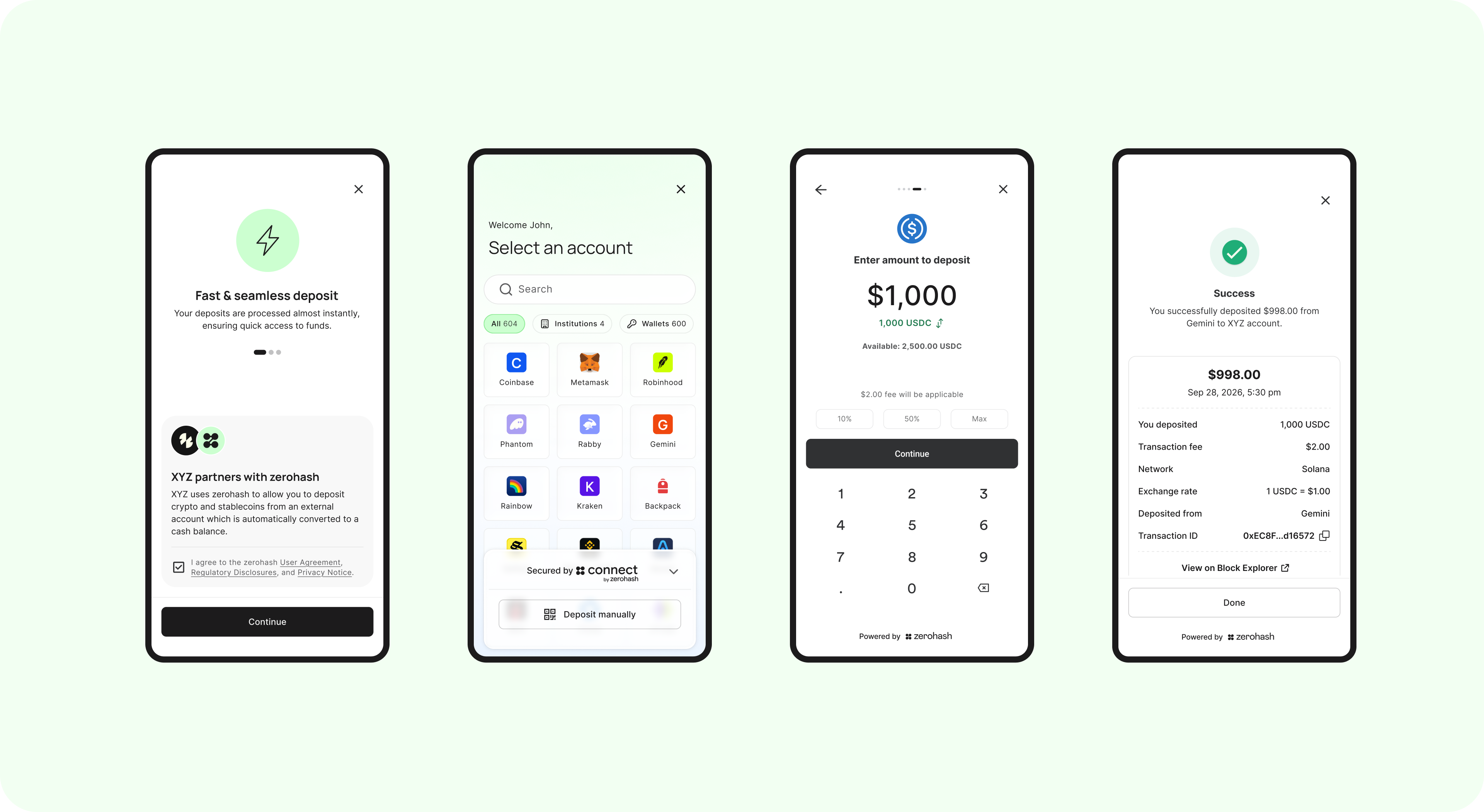
AUTH lets end users link external accounts and transfer onchain digital assets without copying wallet addresses or choosing a blockchain network.
AUTH is an onchain authentication and account-linking product that structures transfers around accounts instead of raw wallet addresses. End users connect institutional accounts (held by a provider, such as an exchange) or digital asset wallets (controlled by the wallet holder), authenticate, and authorize transfers within your platform’s application.
Key benefits of AUTH include:
- Simple Experience: Users link accounts and move onchain assets in any direction, with no need to use QR codes or alphanumeric addresses.
- Reliable Onchain Transfers: Onchain transfers complete instantly for crypto, stablecoins, and tokenized assets.
- Chain Abstraction: Customers never need to select a chain. AUTH handles all the routing behind the scenes.
- Broad Reach: Meet users where they already hold onchain assets across 600+ connections.
- Configurable Controls: Choose which accounts, onchain assets, and transfer types are allowed.
- Authentication: Each verified customer links their own external account. Every transfer is user-approved.
Contact zerohash about AUTH to discuss access and your platform’s transfer experience.
Where AUTH fits
AUTH is embedded within other Transact products that move funds on your platform. Today that includes Account Funding and Crypto Transfers, where AUTH powers both the deposit and withdrawal flows.
- Account Funding - AUTH lets end users connect an account to deposit crypto that lands as a fiat balance, or withdraw from a fiat balance as crypto sent to that account.
- Crypto Transfers - AUTH lets end users connect an account to deposit or withdraw crypto directly - the balance on your platform stays in crypto throughout.
How it works
- Select a connection - Your end user opens an AUTH-enabled deposit or withdrawal flow and selects a supported custodial account or self-custodial wallet
- Authenticate and link - Your end user completes the selected connection’s authentication steps, including multi-factor authentication when required, and grants permission to link the account
- Review and transfer - Your end user chooses an available asset, reviews the transfer details, and authorizes the onchain transfer without copying a wallet address or choosing a blockchain network
Read How AUTH works for the end user flow.
Plan your AUTH experience
Get started
- Contact zerohash about AUTH to discuss access and the products you want to support.
- Configure AUTH with zerohash for your platform.
- Follow Getting started with AUTH to integrate an SDK and test transaction statuses.
Updated 8 days ago