
AUTH v1.0 - AUTH Connect (Legacy)
Connect SDKs provide callback functions to handle key events during the deposit and withdrawal lifecycle. This guide covers callback implementation for both Auth (deposit) and Withdraw SDKs.
The following packages are deprecated, however will continue to be supported for active Platforms
NPM Packages
Auth SDK (Deposits)
- https://www.npmjs.com/package/@connect-xyz/auth-react
- https://www.npmjs.com/package/@connect-xyz/auth-js
Withdrawal SDK
- https://www.npmjs.com/package/@connect-xyz/withdraw-react
- https://www.npmjs.com/package/@connect-xyz/withdraw-js
Overview
Callbacks enable your application to programmatically respond to SDK events such as transaction completions, errors, and user interactions. All callbacks are optional but recommended for production implementations.
Callback Types
| Callback | Auth SDK (Deposits) | Withdraw SDK | Description |
|---|---|---|---|
onError | ✅ | ✅ | Error handling for SDK operations |
onClose | ✅ | ✅ | User closes the widget interface |
onEvent | ✅ | ✅ | General SDK lifecycle events |
onDeposit | ✅ | ❌ | Deposit transaction completed |
onWithdrawal | ❌ | ✅ | Withdrawal transaction completed |
onLoaded | ✅ | ✅ | Callback function called when the widget is fully loaded |
Shared Callbacks
These callbacks are available in both Auth and Withdraw SDKs.
onError
Triggered when errors occur during SDK operations (network issues, authentication failures, validation errors, etc.).
{
  "errorCode": "auth_error",
  "reason": "Session expired. Please refresh your authentication token."
}
onClose
Triggered when the user closes the SDK interface. No payload provided.
onEvent
Triggered for general SDK lifecycle events. Event types vary by SDK.
Auth SDK - Deposit Submitted:
{
  "type": "deposit.submitted",
  "data": {
    "depositId": "c55481bf-626b-4410-8997-4cee83e1385f"
  }
}
Withdraw SDK - Withdrawal Submitted:
{
  "type": "withdrawal.submitted",
  "data": {
    "withdrawalId": "a1b2c3d4-5e6f-7g8h-9i0j-k1l2m3n4o5p6"
  }
}
onLoaded
Triggered when the widget is fully loaded. No payload provided.
Auth SDK Callbacks
onDeposit
Triggered when a deposit completes (successfully or unsuccessfully).
Success Example:
{
  "data": {
    "depositId": "c55481bf-626b-4410-8997-4cee83e1385f",
    "status": {
      "value": "COMPLETED",
      "details": "Deposit completed",
      "occurredAt": "2025-10-07T19:44:50Z"
    },
    "assetId": "BTC",
    "networkId": "bitcoin",
    "amount": "0.013"
  }
}
Failure Example:
{
  "data": {
    "depositId": "d66592c0-737c-5521-9aa8-5dff94f2496g",
    "status": {
      "value": "FAILED",
      "details": "Deposit failed",
      "occurredAt": "2025-10-07T20:15:30Z"
    },
    "assetId": "ETH",
    "networkId": "ethereum",
    "amount": "0.5"
  }
}
Withdraw SDK Callbacks
onWithdrawal
Triggered when a withdrawal completes (successfully or unsuccessfully).
Success Example:
{
  "data": {
    "withdrawalId": "a1b2c3d4-5e6f-7g8h-9i0j-k1l2m3n4o5p6",
    "status": {
      "value": "COMPLETED",
      "details": "Withdrawal completed",
      "occurredAt": "2025-12-19T15:30:00Z"
    },
    "assetId": "USDC",
    "networkId": "ethereum",
    "amount": "100.00"
  }
}
Failure Example:
{
  "data": {
    "withdrawalId": "b2c3d4e5-6f7g-8h9i-0j1k-l2m3n4o5p6q7",
    "status": {
      "value": "FAILED",
      "details": "Withdrawal failed",
      "occurredAt": "2025-12-19T16:45:00Z"
    },
    "assetId": "BTC",
    "networkId": "bitcoin",
    "amount": "0.025"
  }
}
Implementation Examples
Auth SDK (Deposits)
React SDK
import React from "react";
import { Auth } from "@connect-xyz/auth-react";

function App() {
  const jwt = "your-jwt-token"; // Replace with actual JWT

  return (
    <Auth
      jwt={jwt}
      env="production"
      theme="auto"
      onDeposit={(deposit) => {
        console.log("Deposit completed:", deposit);
      }}
      onError={(error) => {
        console.log("Error occurred:", error);
      }}
      onClose={() => {
        console.log("Widget closed");
      }}
      onEvent={(event) => {
        console.log("Event:", event);
      }}
      onLoaded={() => {
        console.log("Widget loaded",);
      }}
    />
  );
}

export default App;
JavaScript SDK
import { Auth } from '@connect-xyz/auth-js';

// Initialize the SDK
const auth = new Auth({
  jwt: 'your-jwt-token', // Replace with actual JWT
  env: 'production',
  theme: 'auto',
  onDeposit: (deposit) => {
    console.log('Deposit completed:', deposit);
  },
  onError: (error) => {
    console.log('Error occurred:', error);
  },
  onClose: () => {
    console.log('Widget closed');
  },
  onEvent: (event) => {
    console.log('Event:', event);
  },
  onLoaded: () => {
    console.log('Widget loaded');
  }
});

// Render the widget in a container element
auth.render(document.getElementById('connect-auth-container'));
Withdraw SDK
React SDK
import React from "react";
import { Withdraw } from "@connect-xyz/withdraw-react";

function App() {
  const jwt = "your-jwt-token"; // Replace with actual JWT

  return (
    <Withdraw
      jwt={jwt}
      env="production"
      theme="auto"
      onWithdrawal={(withdrawal) => {
        console.log("Withdrawal completed:", withdrawal);
      }}
      onError={(error) => {
        console.log("Error occurred:", error);
      }}
      onClose={() => {
        console.log("Widget closed");
      }}
      onEvent={(event) => {
        console.log("Event:", event);
      }}
      onLoaded={() => {
        console.log("Widget loaded",);
      }}
    />
  );
}

export default App;
JavaScript SDK
import { Withdraw } from '@connect-xyz/withdraw-js';

// Initialize the SDK
const withdraw = new Withdraw({
  jwt: 'your-jwt-token', // Replace with actual JWT
  env: 'production',
  theme: 'auto',
  onWithdrawal: (withdrawal) => {
    console.log('Withdrawal completed:', withdrawal);
  },
  onError: (error) => {
    console.log('Error occurred:', error);
  },
  onClose: () => {
    console.log('Widget closed');
  },
  onEvent: (event) => {
    console.log('Event:', event);
  },
  onLoaded: () => {
    console.log('Widget loaded');
  }
});

// Render the widget in a container element
withdraw.render(document.getElementById('connect-withdraw-container'));
Concurrent SDK Sessions
By default, Connect prevents users from operating multiple concurrent SDK sessions. An SDK session is defined as an active JWT token. Connect enforces this restriction at the user level, identified by the reference_id field provided within the POST /sessions request:
{
  "account": {
    "reference_id": "USER01"
  },
  "session": {
    "metadata": {
	    }
  },
  "scopes": [
    "user:deposit:send"
  ]
}
Once an initial session has been established, if a subsequent session is initiated and the user attempts to perform an action in the original session (for example, by interacting with the SDK), the SDK will display the following error screen:
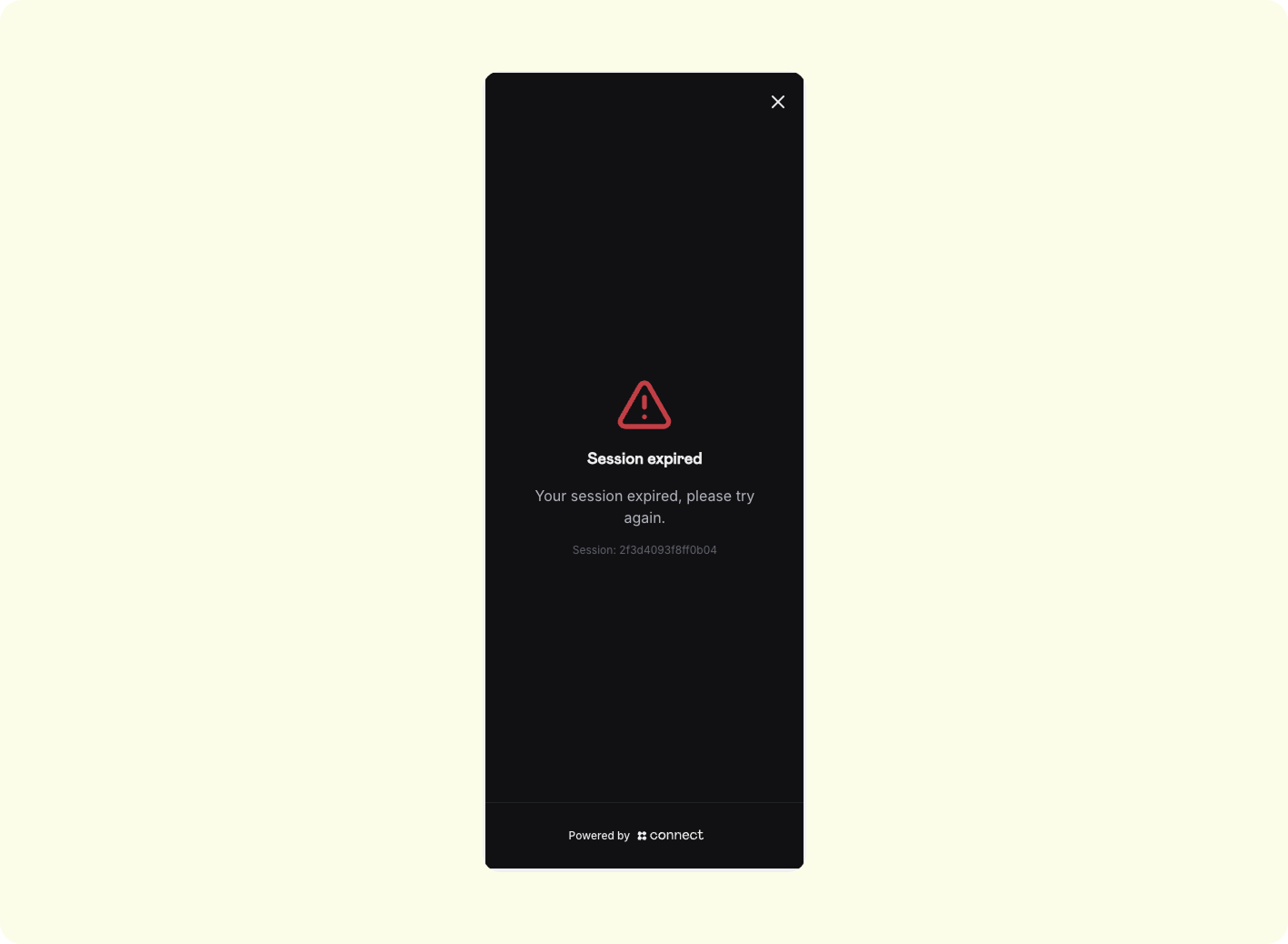
Mobile vs. WebThis behavior applies across platforms. For example, if a user initiates a session on mobile and then starts another session on web, the original mobile session will be invalidated.
Updated about 1 month ago