
Staking
Introduction
zerohash offers comprehensive staking API services that allow platforms to enable native crypto staking for their users. This guide provides best practices for integration, explains the staking lifecycle, and offers guidance on building a seamless user experience.
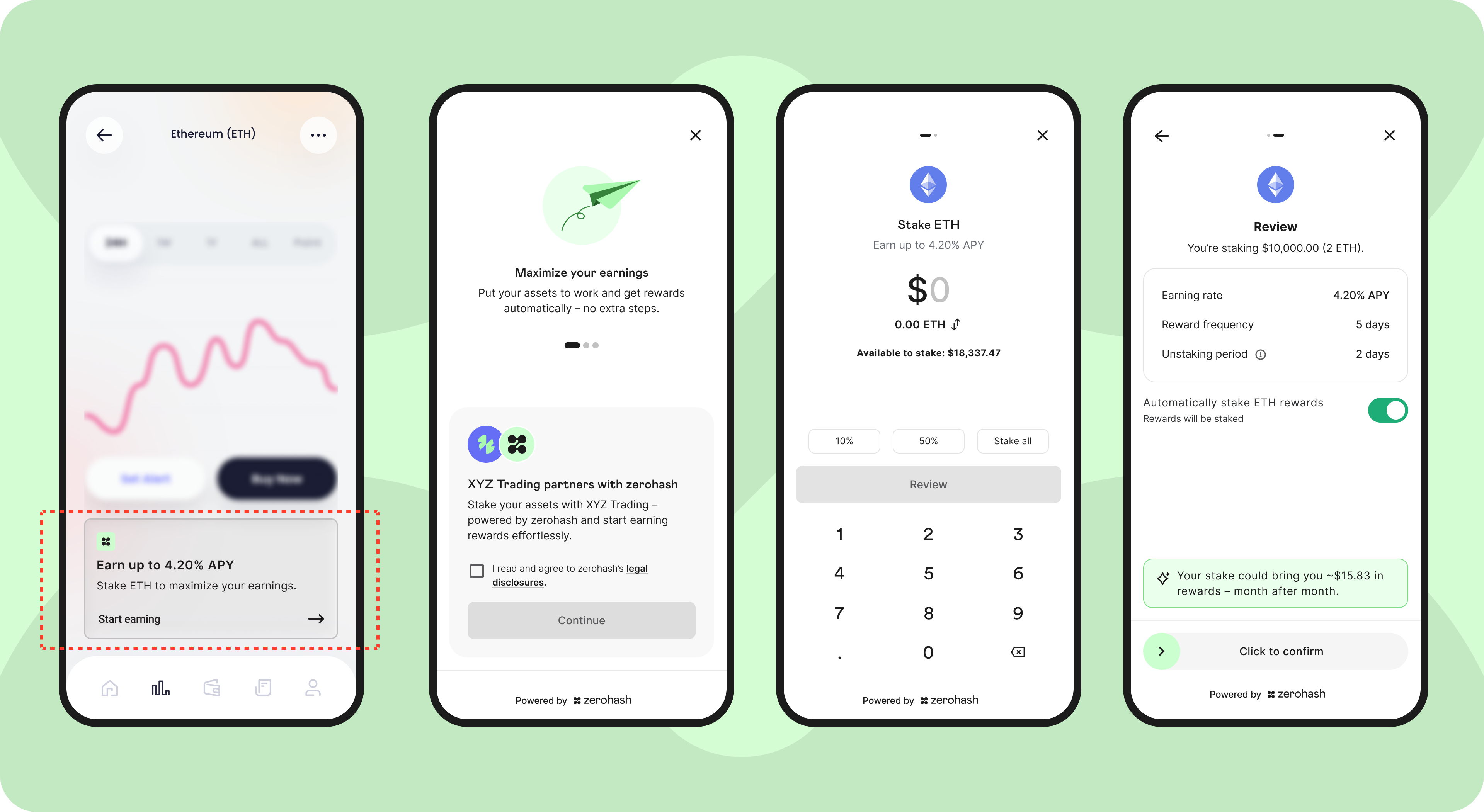
The designs referenced in this documentation represent a conceptual UX framework. For access to the complete design specifications and additional technical resources, please contact your zerohash representative.
Staking is currently available via API only — there is no SDK integration path at this time. zerohash also does not offer liquid staking; staked positions are illiquid for the duration of the network's unstake period and cannot be represented by a transferable receipt token.
Prerequisites
Before enabling staking functionality, ensure your integration supports these requirements:
- KYC verification: End users must be fully KYC-approved zerohash participants. Staking is not available to participants in
pendingorrestrictedstatus. - Jurisdiction eligibility: The participant's resident jurisdiction must be on the staking-permitted list. At this time, staking is prohibited in the following five states: CA, MD, NJ, and WA.
- Terms acceptance: Each participant must have an active
signed_agreementoftype: "staking"on file. A single acceptance enables staking across all supported assets for that participant. - Webhook endpoint: A configured, signature-verified webhook endpoint to receive staking lifecycle events (see Webhooks section below).
- Account funded: The participant must hold a sufficient
availablebalance of the asset being staked.
Core Concepts
Definitions
| Term | Definition |
|---|---|
| Activation Queue | The network-defined queue that newly created validators and stake requests must wait in before becoming active. zerohash manages this queue as the node operator. |
| Activation Time | The delay between a stake being broadcast and the stake becoming active and earning rewards. These are estimates - individual stakes may occasionally take longer. |
| Est. APY (Net) | Annualized percentage yield, expressed net of your Platform fee charged. This is always an estimate - actual rewards vary with network conditions and validator performance. |
| Unstake Period | The mandatory waiting period between initiating an unstake and the funds returning to the available account. Unstake periods are network-specific. Users will continue to earn rewards during this period until the unstaking period is complete. |
| Validator | The node that produces blocks and attests to network state in exchange for rewards. zerohash manages this infrastructure on behalf of platforms. |
| Consensus Rewards | The base protocol-level rewards paid to validators for attestation and block proposal. Credited to the participant's staked balance and compounded into the stake. |
| MEV Rewards | Additional rewards from Maximal Extractable Value capture (priority fees, block ordering). Credited to the participant's available balance rather than compounded into the stake. |
Supported Assets
Currently supported cryptocurrencies with staking:
- ETH (Ethereum)
- SOL (Solana) - Q4 2026
- Additional assets: Coming soon!
Configurable Platform Fees
Staking yield is reported net of the platform fee you choose to set. The advertised APY in GET /assets/{asset}/staking_info already reflects this deduction.
Staking on zerohash uses a fee model based on gross network rewards. Platforms set their own end-user pricing.
How the model works
- Gross rewards are paid by the network to the staking position.
- Your platform applies a platform fee — a percentage deducted from gross rewards before the remainder is credited to the user. zerohash recommends a platform fee of 25–35% (i.e. users receive 65–75% of gross rewards), but platforms control their own pricing and can configure higher or lower.
- The user's net reward equals gross rewards minus the platform fee.
- The platform earns revenue from the platform fee, net of zerohash's processing fee. Specific commercial terms are set in your zerohash agreement — contact your Relationship Manager for more details on this.
| Component | Ex. Amount | % of gross rewards |
|---|---|---|
| Gross rewards | $100 | 100% |
| User reward (pass-through) | $70 | 70% |
| Platform fee | $30 | 30% |
ℹ️ Note on apy_net: The APY returned by GET /assets/{asset}{asset}/staking_info is platform-specific and reflects your configured platform fee. Different platforms querying the same asset will see different apy_net values.
Staking Lifecycle and State Machine
The staking process follows a clear journey from discovery to unstaking. We recommend using both API polling and webhook notifications to track a stake's status throughout this flow.
Stake States
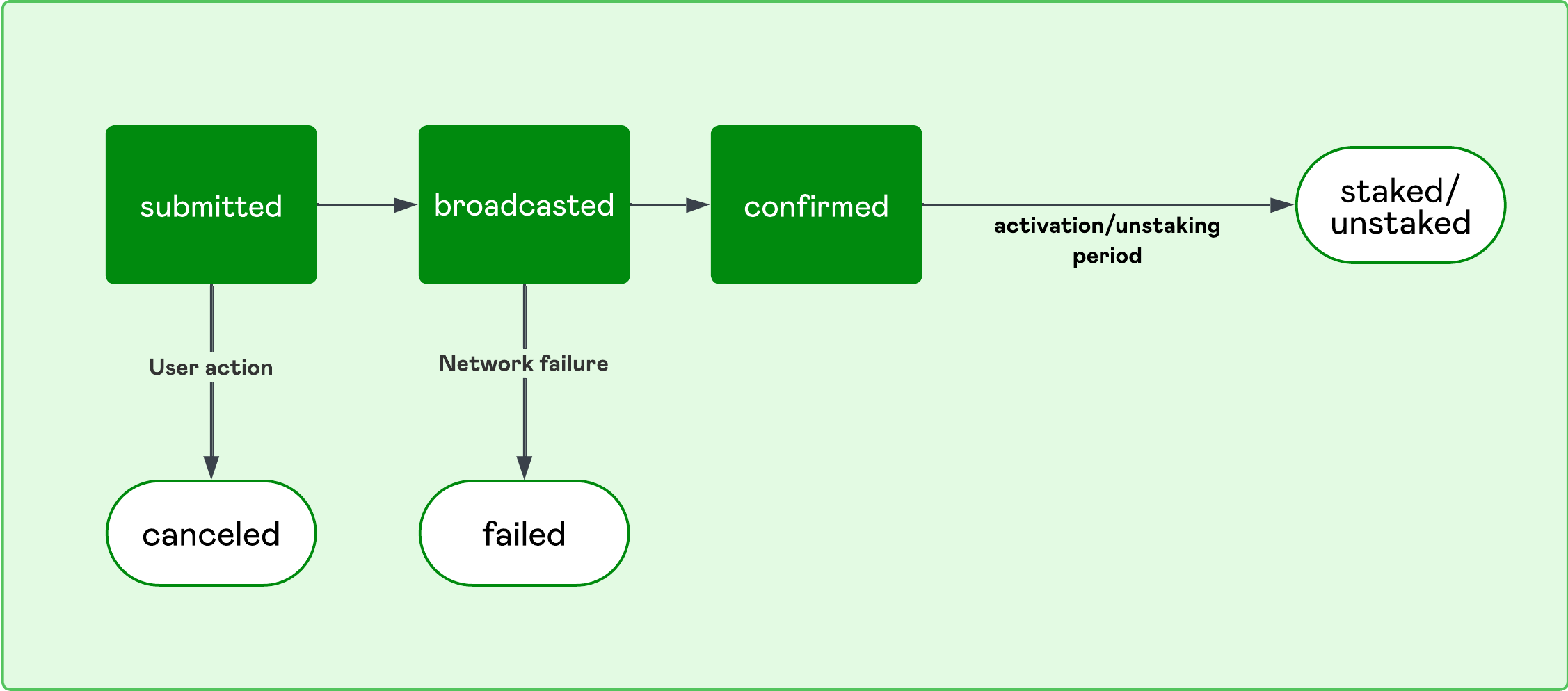
submitted— Request accepted; queued for blockchain broadcast.queued- Request has been picked up into a batch and is awaiting broadcast to the network. Still cancelable up until the batch is broadcast.broadcasted— Transaction signed and sent to the network.confirmed— Stake entered the consensus activation queue. (Note: on-chain broadcast acknowledgement is signaled bybroadcasted.)staked— Terminal active state; position is earning rewards.canceled— Terminal; user canceled before broadcast.failed— Terminal; transaction rejected. Requires resubmission.
Unstake States
submitted— Unstake request accepted; queued for blockchain broadcast.queued- Batched, awaiting broadcast. Still cancelable.broadcasted— Unstake transaction sent to network.confirmed— Unstake entered the exit queue (cooling-down); unstaking waiting period underway.unstaked— Terminal; funds returned to the available account.canceled— Terminal; user canceled before broadcast.failed— Terminal; unstake transaction rejected. Requires resubmission.
User Flow
1. Discovery and Initiation
Help users discover which assets they can stake and understand the terms.
- Use GET /assets?staking_enabled=true to retrieve only stakeable assets
- Display staking information using GET /assets/{asset}/staking_info
- ⚠️ Please note all the staking information provided at
GET /assetsare estimates and subject to change with network conditions.
- ⚠️ Please note all the staking information provided at
- Show available balances via GET /accounts?account_type=available
UX Best Practices
- Make the unstaking period impossible to miss - confusion on this can lead to high volumes of support issues
- Highlight that APY estimates may fluctuate based on network conditions
- Consider showing a simple ROI calculator for different stake amounts
- For restricted jurisdictions, suppress all staking UI entirely
2. Eligibility and Compliance
Before allowing stake submission, confirm the user has accepted terms and has sufficient balance.
- Check terms acceptance status via GET /participant/{participant\_code}/full_info
- Check for the
"signed_agreements"array element with"type" : "staking"
- Check for the
- If terms not accepted, prompt user and update via PATCH /participants/customers/{participant\_code}
- Validate balance using GET /accounts?account_type=available before showing stake confirmation screen
- Store terms acceptance status locally to minimize API calls
⚠️ Important: All staking operations are blocked until terms are accepted. Single acceptance enables staking for ALL supported assets.
UX Best Practices
- Present terms acceptance as a one-time action that enables staking for all assets
- Explain this is required for regulatory compliance
- For users in restricted jurisdictions, do not surface any staking UX
3. Staking Execution
Once the user confirms their stake details, submit the request and begin tracking.
- User confirms staking transaction details (amount, estimated reward APY, estimated unstaking period)
- Submit stakes using POST /stakes. The request takes
amount- the quantity of the asset to stake, for example "0.5" ETH. - Store the returned
stake_id- you'll need it for future operations - The 201 response also returns
activation_period_daysandestimated_active_at. Useestimated_active_atto show users when their stake is expected to begin earning. Both are estimates and are omitted when unavailable. - Listen for
stake.submittedwebhook - Stake requests can be canceled while in
submittedorqueuedstatus via POST /stakes/{stake\_id}/cancel. Batches are broadcast once daily after operational approval, so in practice a request placed today is cancelable until that day's broadcast. Once broadcasted, cancellation is not possible and the position must be unstaked after activation.
⚠️ Important: Once broadcasted, cancellation is not possible. Users must wait for activation to complete, then unstake.
UX Best Practices
- Show a clear confirmation screen with all terms before submission
- Provide immediate visual feedback that submission succeeded
- Make the cancel option obvious while it's still available and hide when unavailable
4. Activation and Monitoring
Track stake progress as it moves from submission to actively earning rewards.
- Stakes move through several states, and real-time statuses will be provided via webhooks:
stake.submitted→ Request accepted, queued for processingstaked.queued→ Transaction pending daily batch executionstake.canceled→ User canceled a stake request before it was broadcastedstake.broadcasted→ Transaction sent to blockchainstake.confirmed→ Transaction confirmed on-chainstake.staked→ Actively earning rewardsstake.failed→ Stake request failed and must be requested again
- Monitor stake status via GET /stakes/{stake\_id}/status
UX Best Practices
- Show progress indicators during the activation period
- Use
estimated_active_atfrom the stake response rather than a hardcoded duration. ETH activation is currently around 3 days and may vary.- Notify users when their stake becomes active and starts earning
- For failed stakes, clearly explain that the user needs to resubmit
5. Ongoing Management
Rewards are calculated and credited daily per participant, per asset. Where they land depends on the reward type:
- Consensus rewards on an actively staked balance compound back into the staked balance. The staked balance grows without a new deposit.
- MEV rewards, and any rewards earned on a balance that is mid-unstake, are credited to the available balance.
Both types increase lifetime rewards. Each row from GET /stakes/{participant\\_code}/rewards is a per-day, per-asset aggregate - reward_id encodes the UTC day, for example ETH.20260903T000000Z - so a single row can contain both a consensus and an MEV component.
- Subscribe to
staking_reward.receivedwebhooks for real-time reward notifications - Use GET /stakes/{participant\_code} to list a participant's stakes
- Use GET /stakes/{participant_code}/{asset}/summary for aggregate staked balance, lifetime rewards, and current APY
- Use GET /stakes/{participant\_code}/rewards for detailed reward history
- Refresh portfolio data periodically (every 5 minutes while the user is viewing is sufficient)
Reading the summary endpoint:
total_staked and total_rewards_earned are independent values, not two views of the same number.
total_staked- the participant's current staked balance for the asset. A live balance, not a running total of deposits. Because consensus rewards compound, this can rise with no new stake.total_rewards_earned- lifetime cumulative rewards for the participant and asset. Never reduced by unstaking, never resets, including after a full unstake and later restake.average_apy_net- the current asset-level APY net of your platform fee. Identical for every participant staking that asset on your platform. Not a per-participant or realized yield, and it will not reconcile against the two figures above. Best effort - may return 0 if the upstream rate source is momentarily unavailable.
UX Best Practices
- Display total staked amount, total rewards earned, and current estimated APY. The API returns asset amounts only - convert to fiat on your side using your preferred price source.
- Include rewards as distinct line items in transaction history sections
- Allow users to view individual stakes or consolidated portfolio view
6. Unstaking
When users want to access their staked funds, guide them through the unstaking process and waiting period.
- Check staked balances via GET /accounts?account_type=staked
- Submit unstake requests using POST /stakes/unstake
- Store
unstake_idfor tracking and support purposes - Unstake requests can be canceled while submitted or queued via POST /stakes/unstake/{unstake_id}/cancel
- List a participant's unstake activity via GET /stakes/{participant_code}/unstakes. Note that GET /stakes/{participant_code} returns stake records only.
- GET /stakes/unstake/{unstake_id}/status returns
completed_atonce the unstake reaches unstaked.estimated_available_atis a pre-completion estimate and should not be used as the completion timestamp. Theunstake.unstakedwebhook remains the canonical completion signal for platforms that prefer push over polling. - Unstakes move through several states, and real-time statuses will be provided via webhooks:
unstake.submitted→ Request accepted, queued for processingunstake.queued→ Transaction pending daily batch executionunstake.canceled→ User canceled an unstake request before it was broadcastedunstake.broadcasted→ Transaction sent to blockchainunstake.confirmed→ Transaction confirmed on-chainunstake.unstaked→ No longer staked, balance available to transact/tradeunstake.failed→ Unstake request failed and must be requested again
UX Best Practices
- Show unstaking period prominently before user commits
- Explain that rewards continue to accrue until unstake reaches terminal unstaked state
- Notify users when funds become available to trade or transact
Account Types and Ledger Balances
zerohash uses three distinct account types to track staking lifecycle states. Understanding how balances move between these accounts is essential for accurate balance reporting and transaction handling.
Account Type Definitions
account_type | Description | Use Cases |
|---|---|---|
available | Funds that can be used to transact, trade, or stake | Buying, selling, transferring, withdrawing, or initiating new stakes |
collateral | Funds pending activation or pending unstaking period | Monitoring stakes during activation queue or unstaking waiting period |
staked | Funds actively staked and earning rewards | Tracking active staking positions and accrued rewards |
Balance Flow Rules
During Staking:
- Funds move from
available→collateralwhen a stake is submitted - Funds move from
collateral→stakedwhen the stake is confirmed and actively earning rewards
During Unstaking:
- Funds move from
staked→collateralwhen an unstake is submitted - Funds move from
collateral→availablewhen the unstaking period completes
Important Constraints
- Balances in
collateralaccount_typemust reach the staked state before they can be unstaked - Balances in
stakedaccount_typemust be unstaked before participants can withdraw or sell those assets - Only balances in the
availableaccount_typecan be used for trading, transfers, or withdrawals
💡 Implementation Tip: Use GET /accounts?account_type={type} to query specific account types when displaying balances to users. Show all three account types in staking portfolio views to provide complete transparency.
Stake and Unstake Minimums
No minimums. Users can stake or unstake any amount they hold in available or staked respectively.
Error Handling
Common validation errors and recommended handling:
- Terms not accepted: Redirect user to T&C acceptance flow.
- Insufficient balance: Display current balance.
- Jurisdiction restrictions: Display appropriate messaging about availability.
- Asset not supported: Filter out non-stakeable assets in UI.
- Pool capacity exceeded: Inform user and prompt retry.
- Terms revoked mid-flight: Block submission and prompt re-acceptance.
Error Response Format
All error responses follow this structure:
{
  "error_code": "ERROR_IDENTIFIER",
  "message": "Technical error description",
  "details": {
    "participant_code": "CUST01",
    "stake_id": "c761fc96-5c44-40d4-8eb2-3fcd5d06754e",
    "asset": "ETH",
    "validation_checks": {
      "jurisdiction_allowed": true,
      "terms_accepted": false,
      "platform_restrictions": "none",
      "sufficient_balance": true
    }
  },
  "user_message": "",
  "request_id": "req_123456789",
  "timestamp": "2026-05-21T16:00:00Z"
}
Common Error Codes
Validation Errors (400)
TERMS_NOT_ACCEPTED
{
  "error_code": "TERMS_NOT_ACCEPTED",
  "message": "User must accept staking terms before proceeding",
  "user_message": "Please review and accept our staking terms and conditions"
}
INSUFFICIENT_BALANCE
{
  "error_code": "INSUFFICIENT_AVAILABLE_BALANCE",
  "message": "Available balance insufficient for requested stake amount",
  "details": {
    "asset": "ETH",
    "requested_amount": "35.0",
    "available": "8.2"
  },
  "user_message": "You do not have enough ETH to complete this stake"
}
INSUFFICIENT_STAKED_BALANCE
{
  "error_code": "INSUFFICIENT_STAKED_BALANCE",
  "message": "Staked balance insufficient for requested unstake amount",
  "details": {
    "asset": "ETH",
    "requested_amount": "0.8",
    "staked": "0.5"
  },
  "user_message": "You do not have enough staked ETH to complete this unstake"
}
JURISDICTION_RESTRICTED
{
  "error_code": "JURISDICTION_RESTRICTED",
  "message": "Staking not available in user's jurisdiction",
  "details": {
    "participant_code": "CUST01",
    "jurisdiction": "CA"
  },
  "user_message": "Staking is not currently available in your location"
}
Authentication Errors (401)
INVALID_TOKEN
{
  "error_code": "INVALID_TOKEN",
  "message": "Authentication token is invalid or expired",
  "user_message": "Please log in again"
}
Server Errors (500)
INTERNAL_SERVER_ERROR
{
  "error_code": "INTERNAL_SERVER_ERROR",
  "message": "An unexpected error occurred",
  "user_message": "Something went wrong. Please try again later"
}
Quick Reference
Essential Endpoints
- Discover stakeable assets: GET /assets?staking_enabled=true
- Validate available balance: GET /accounts?account_type=available
- Check staking parameters: GET /assets/{asset}/staking_info
- Verify terms acceptance: GET /participant/{participant\_code}
- Update terms acceptance: PATCH /participants/customers/{participant\\\_code}
- Submit stake: POST /stakes
- Cancel pending stake: POST /stakes/{stake\\\_id}/cancel
- Monitor stake status: GET /stakes/{stake\_id}/status
- View portfolio: GET /stakes/{participant\_code}
- Track rewards: GET /stakes/{participant\_code}/rewards
- Staking summary: GET/stakes/{participant_code}/{asset}/summary
- Submit unstake: POST /stakes/unstake
- Cancel pending unstake: POST /stakes/unstake/{unstake\\\_id}/cancel
- Monitor unstake status: GET /stakes/unstake/{unstake\\\_id}/status
- List participant unstakes: GET /stakes/{participant_code}/unstakes
- Webhooks: https://docs.zerohash.com/reference/staking-webhooks
Support and Resources
Please contact your dedicated Relationship Manager for:
- Frontend standards and implementation requirements
- Sample UX designs and the UX research report
- Setting your platform fee
- User education materials and user-facing FAQs
- Any additional integration support
Updated 14 days ago