
Accounts Receivable Integration Guide
Generate re-usable deposit addresses for Merchants and their Third Party Payors
zerohash B.V. (EU entity)The following steps should be followed if you're onboarding a Customer to zerohash B.V. (the EU entity). For EU API calls, use base URL: https://api.zerohash.eu
Stablecoins only for Third Party Payor Accounts Receivable DepositsNon-stablecoin deposits received from Third Party Payors will trigger a fund failure event for Platforms onboarded to zerohash B.V.
Overview
Platforms can use POST /fund/rfq to facilitate to two kinds of deposits:
- Account funding (me-to-me): the Merchant funds its own account with a re-usable address for deposits they send themselves.
- Third Party Payor deposits: the merchant's customers, called Third Party Payors, pay what they owe the merchant, for example to settle an invoice. One re-usable deposit address per Third Party Payor.
zerohash name matches each deposit's Travel Rule information against the expected Sender linked to the deposit address. Matched deposits are auto-converted and credited to the Merchant's available balance.
Key Concepts
| Term | Definition |
|---|---|
| Merchant | An onboarded Non-natural Person (NNP) on your platform that receives funds. The merchant is a zerohash customer and the account owner. |
| Third Party Payor | A business or individual that sends funds to a merchant, for example to settle an invoice. It is a separate legal entity from the merchant and is not a zerohash customer. |
| Expected Sender | Used throughout this guide to reference which Third Party Payor or Merchant is associated with a deposit address |
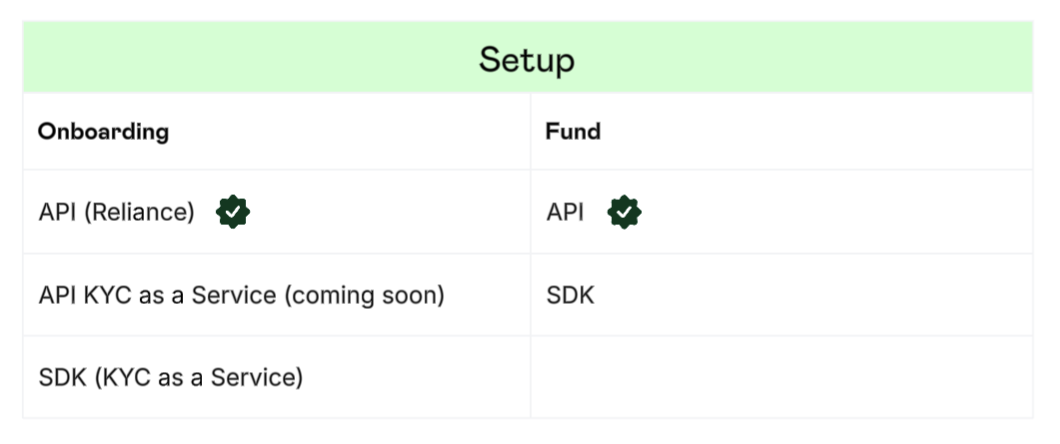
Setup
In this guide, the Platform is setup to use the zerohash europe B.V. Onboarding API (Reliance) hosted by api.zerohash.eu, along with the zerohash europe B.V.
Flow
The following example illustrates a Platform configuration where incoming stablecoin deposits are name matched to the Expected Sender, then automatically converted to USD and subsequently swept to the Platform’s master ledger account.
Webhook configuration
Talk to your zerohash representative to have your Platform configured for the following webhooks:
Onboarding via API (Reliance)
The Platform will use an external, non-zerohash KYC provider to perform proper verification of the Customer. After a successful verification, pass the results to zerohash via API.
Submit Merchant
Non-natural person
To submit the Merchant as a zerohash customer, use the POST /participants/entity/new endpoint.
Example request:
{
  "entity_type": "corporation",
  "platform_code": "PLAT01",
  "entity_name": "Entity Name",
  "legal_name": "Legal Name",
  "contact_number": "+15557778888",
  "date_established": "1985-09-02",
  "address_one": "123 Main St.",
  "city": "Paris",
  "postal_code": "12345",
  "tax_id": "000-00-0000",
  "id_issuing_authority": "US",
  "risk_rating": "low",
  "sanction_screening": "pass",
  "sanction_screening_timestamp": 1603378501286,
  "signed_timestamp": 1603378501286,
  "signed_agreements": [
      {
      "region": "eu",
      "type": "account_funding_general",
      "signed_timestamp": 1603378501286
      }
    ],
  "submitter_email": "[email protected]",
  "control_persons": [
      {
      "sanction_screening": "pass",
      "kyc": "pass",
      "name": "John Smith",
      "email": "[email protected]",
      "address_one": "123 Main St.",
      "city": "Paris",
      "postal_code": 12345,
      "jurisdiction_code": "US-IL",
      "date_of_birth": "1985-09-02",
      "phone_number": "+15557778888",
      "citizenship_code": "PT",
      "tax_id": "000-00-0000",
      "id_number_type": "eu_drivers_license",
      "id_number": 123456789,
      "id_issuing_authority": "PT",
      "sanction_screening_timestamp": 1603378501286,
      "kyc_timestamp": 1603378501286
      }
    ],
  "beneficial_owners": [
      {
      "sanction_screening": "pass",
      "kyc": "pass",
      "name": "John Smith",
      "email": "[email protected]",
      "address_one": "123 Main St.",
      "city": "Paris",
      "postal_code": 12345,
      "jurisdiction_code": "US-IL",
      "date_of_birth": "1985-09-02",
      "phone_number": "+15557778888",
      "citizenship_code": "PT",
      "tax_id": "000-00-0000",
      "id_number_type": "eu_drivers_license",
      "id_number": 123456789,
      "sanction_screening_timestamp": 1603378501286,
      "kyc_timestamp": 1603378501286
    }
  ],
  "chamber_of_commerce_number": "KVK-12345678",
  "activity_locations": [
    "PT, FR"
  ],
  "entity_source_of_funds": "crypto_activities",
  "declaration_no_foreseeable_changes": true,
  "reason_for_business_relationship": "Digital asset custody and trading services for institutional clients",
  "board_members": [
    {
      "sanction_screening": "pass",
      "sanction_screening_timestamp": 1603378501286,
      "id_issuing_authority": "US",
      "id_number": 123456789,
      "id_number_type": "us_passport",
      "tax_id": "000-00-0000",
      "citizenship_code": "US",
      "place_of_birth_country_code": "US",
      "place_of_birth_name": "Chicago",
      "date_of_birth": "1985-09-02",
      "jurisdiction_code": "US-IL",
      "postal_code": 12345,
      "city": "Chicago",
      "address_one": "123 Main St.",
      "email": "[email protected]",
      "last_name": "Smith",
      "first_name": "John"
    }
  ],
  "country": "IRL",
  "id_number": "549300TRWGQX5XMHYZ82",
  "expected_annual_volume": "over_500k",
  "id_number_type": "legal_entity_identifier"
}
'
zerohash will respond with a participant_code that uniquely identifies the customer. See more detail on EU participant creation here.
If you fail to indicate that the End Customer has agreed to the account funding-specific terms, in the signed_agreements object shown above, /fund API calls will fail.
There may be situations where the Platform is restricted from submitting Customers who reside in Prohibited Jurisdictions. The Platform will receive an error that looks like:
{
    "errors": [
        "The submitting platform is not allowed to operate in the participant's resident state",
        "participant is not in an allowed jurisdiction"
    ]
}
The preferred approach is for the Platform to not allow customers to onboard on their side (through a feature flag, for example). However, if a request with a Customer in a blocked jurisdiction does get submitted to zerohash via API, the Platform should fail gracefully and display a descriptive error message on-screen.
See more detail on permitted jurisdictions here.
Idempotency
You can make your requests idempotent by using the request_id field. If a subsequent call is made with a previously used request_id, then the request would fail with an error code 400, error message “requestID already used with different participant data”.
Submit Third Party Payor
Non-natural person
To submit a business as a Third Party Payor, use the POST /participants/entity/new endpoint with onboarding_profile set to third_party_payor.
| Field | Required | Description |
|---|---|---|
onboarding_profile | Yes | Must be third_party_payor |
merchant_participant_code | Yes | Participant code of the merchant (NNP) the payor is paying |
legal_name | Yes | Registered legal business name |
dba_name | Yes | Trading or DBA name |
address_one | Yes | Legal address, line 1 |
address_two | No | Legal address, line 2 |
city | Yes | City |
postal_code | Yes | Postal code |
country | Yes | Country of the legal address |
email | Yes | Business email |
contact_number | No | Business phone number |
legal_entity_identifier or company_registration_number or tax_id | Yes, one of | LEI or Company Registration Number or TIN |
incorporation_address.jurisdiction_code | Yes | ISO 3166-2 jurisdiction of incorporation, used to validate the jurisdiction |
date_established | Yes | Date of incorporation |
merchant_category_code | Yes | Payor's MCC |
sanction_screening | No | Sanction screening result. Approved platforms only, see below |
sanction_screening_timestamp | No | Time the platform ran the screening. Required if sanction_screening is sent |
Example Request:
{
  "onboarding_profile": "third_party_payor",
  "merchant_participant_code": "MERCH1",
  "legal_name": "Acme Supplies B.V.",
  "dba_name": "Acme Supplies",
  "address_one": "1 Example Street",
  "city": "Amsterdam",
  "postal_code": "1011AB",
  "country": "Netherlands",
  "email": "[email protected]",
  "legal_entity_identifier": "5493001KJTIIGC8Y1R12",
  "company_registration_number": "12345678",
  "incorporation_address": { "jurisdiction_code": "NL-NH" },
  "date_established": "2015-04-01",
  "merchant_category_code": "5045",
  "request_id": "8f14e45f-ceea-4672-a0a2-5f1c3e2b9d10"
}
Natural persons
To submit an individual, use the POST /participants/customers/new endpoint with onboarding_profile set to third_party_payor.
| Field | Required | Description |
|---|---|---|
onboarding_profile | Yes | Must be third_party_payor |
partial | Yes | Must be true (only relevant when onboarding a natural person) |
merchant_participant_code | Yes | Participant code of the merchant (NNP) the payor is paying |
first_name | Yes | Legal first name of the payor |
last_name | Yes | Legal last name of the payor |
dba_name | Yes | Trading or DBA name (applicable only if natural person is acting as a business) |
address_one | Yes | Legal address, line 1 |
address_two | No | Legal address, line 2 |
city | Yes | City |
postal_code | Yes | Postal code |
country | Yes | Country of the legal address |
email | Yes | Email, used for fund recovery scenarios |
phone_number | No | Phone number |
tax_id | Yes | TIN, The national ID of the individual, e.g. a social security number |
id_number | Yes | The ID number for the individual |
id_number_type | Yes | Form of ID associated with id_number |
citizenship_code | Yes | Individual's citizenship code |
date_of_birth | Yes | Date of birth |
merchant_category_code | Yes | Payor's MCC (applicable only if natural person is acting as a business) |
sanction_screening | No | Sanction screening result. Approved platforms only, see below |
sanction_screening_timestamp | No | Time the platform ran the screening. Required if sanction_screening is sent |
Example Request:
{
  "onboarding_profile": "third_party_payor",
  "merchant_participant_code": "MERCH1",
  "first_name": "Jane",
  "last_name": "Doe",
  "dba_name": "Jane Doe Consulting",
  "email": "[email protected]",
  "address_one": "1 Example Street",
  "city": "Amsterdam",
  "postal_code": "1011AB",
  "citizenship_code": "NL",
  "date_of_birth": "1985-01-01",
  "id_number_type": "passport",
  "id_number": "X0000000",
  "tax_id": "000000000",
  "merchant_category_code": "5045",
  "request_id": "3c59dc04-8b2e-4f1a-9d6e-2a7b5c4e1f22"
}
For either payor type, if a required field is missing, the request fails and the response names the missing fields. The payor is not added to the allow list for that merchant. Fix the request and resubmit.
Sanction Screening
By default, zerohash runs its sanction screening controls on every Third Party Payor submitted. Approved platforms can screen payors themselves and pass the result in sanction_screening and sanction_screening_timestampfor real-time approval of the Third Party Payor. Otherwise, Third Party Payor will be in pending state until sanction screening has been completed by zerohash. Ask your zerohash representative about approval.
Whitelist a self-custody sending wallet
If the Merchant or Third Party Payor is paying from a self-custody wallet, whitelist the sending address with the POST /travel-rule/submit endpoint before they send funds. Deposits from Exchanges send Travel Rule information through the Travel Rule network, so no whitelisting is needed.
 {

  "address": "0xABC123",
  "participant_code": "MERCH1",
  "address_owner_type": "business",
  "business_pii": {
    "legal_entity_name": "Business XYZ",
    "legal_entity_identifier": "123456789", //optional, only send when available
    "legal_entity_address": "1 Example St, Dublin"
  },
  "wallet_type": "self_custody",
  "deposit_id": "123456789" //optional, only send when referencing a specific deposit
}
Find more information on Travel Rule here.
Create a deposit address for a Third Party Payor
Each Third Party Payor must use a deposit address that is unique to them for you-to-me Accounts Receivable deposits. To create a re-usable deposit address for a Third Party Payor, use the POST /fund/rfq endpoint and specify the Expected Sender for the address using account_label.
Example Request:
{
   "participant_code":"MERCH1",
   "fund_asset":"USDC.ETH",
   "account_label":"PAYOR1",
   "client_fund_id":"abc123" //always optional
}
Notes:
- See
client_fund_idrelease notes on behavior here. - See POST /fund/rfq API reference for possible responses.
Third Party Payor deposits stablecoins
Merchants can use the deposit_address returned by POST /fund/rfq to facilitate an Accounts Receivable payment from the Expected Sender. The address doesn't expire, so the Merchant can re-use it on every invoice to the Third Party Payor linked to that address. Any amount within the standard minimum and maximum thresholds is accepted. All deposits made to this address will be auto-converted to USD and transferred to your account on our ledger.
Deposit outcomes and webhooks
Platforms should be listening to the following webhooks for Accounts Receivable:
When a deposit reaches a Merchant's address, zerohash name matches its Travel Rule information against the Expected Sender, as specified in the account_label. The Travel Rule information comes either from the Travel Rule network or from a whitelisted self-custody wallet.
| Condition | Outcome | Webhook |
|---|---|---|
| Travel Rule information matches the Expected Sender | Deposit is converted and credited to available. | Account Funding webhook with status_reason_code = DEPOSIT_PROCESSED and account_label referencing the Third Party Payor's participant code |
| Travel Rule information does not match the Expected Sender | Funds are held and not credited | Account Funding webhook with Deposit/Withdraw webhook with |
| No Travel Rule information received | Standard Travel Rule collateral flow: a 48-hour remediation window.
Find more information on Travel Rule information remediation here. | Account Funding webhook with Deposit/Withdraw webhook with |
| Travel Rule information matches the Expected Sender, Fund Failure Scenario (ex. deposit below minimum, received asset not enabled) | Funds are not converted and are credited to recovery_qurantine. The Third Party Payor can recover funds from the zerohash europe branded secondary portal. | Account Funding webhook with status_reason_code varying depending on failure reasonDeposit/Withdraw webhook with state = completed |
Create a deposit address for the Merchant
Merchants must also use a deposit address that is unique to them for me-to-me Account Funding deposits. To create a re-usable deposit address for a Merchant, use the POST /fund/rfq endpoint. No account_label needs to be specified for Merchant deposit addresses, and funds will be automatically legered to account_label = general.
Example Request:
{
   "participant_code":"MERCH1",
   "fund_asset":"USDC.ETH",
   "client_fund_id":"abc123"
}
Notes:
- See
client_fund_idrelease notes on behavior here. - See POST /fund/rfq API reference for possible responses.
Merchant deposits crypto or stablecoins
Merchants can use the deposit_address returned by POST /fund/rfq to facilitate an Account Funding (me-to-me) deposit. The addresses don't expire, so the Merchant can re-use their unique deposit address. Any amount within the standard minimum and maximum thresholds is accepted. All deposits made to this address will be auto-converted to USD and transferred to your account on our ledger.
Deposit outcomes and webhooks
Platforms should be listening to the following webhooks for Accounts Receivable:
When a deposit reaches a Merchant's address, if the account_label is not specified as an Expected Sender, then zerohash name matches its Travel Rule information against the Merchant. The Travel Rule information comes either from the Travel Rule network or from a whitelisted self-custody wallet.
| Condition | Outcome | Webhook |
|---|---|---|
| Travel Rule information matches the Merchant | Deposit is converted and credited to available. | Account Funding webhook with status_reason_code = DEPOSIT_PROCESSED and account_label = general |
| Travel Rule information does not match the Merchant | Funds are held and not credited | Account Funding webhook with Deposit/Withdraw webhook with |
| No Travel Rule information received | Standard Travel Rule collateral flow: a 48-hour remediation window.
Find more information on Travel Rule information remediation here. | Account Funding webhook with Deposit/Withdraw webhook with |
| Travel Rule information matches the Merchant, Fund Failure Scenario (ex. deposit below minimum, received asset not enabled) | Funds are not converted and are credited torecovery_qurantine. The Merchant can recover funds from the zerohash europe branded secondary portal. | Account Funding webhook with status_reason_code varying depending on failure reasonDeposit/Withdraw webhook with state = completed |
Invoice Auditing & Additional Diligence Scenarios
zerohash audits invoice-based business-to-business transactions every month, after they settle. The audit looks for misuse of the product to exchange controlled or restricted goods and services, including those subject to export or import restrictions, in cross-border trade. When a transaction is selected, the Platform must provide the invoice and, for some triggers, additional diligence information within 15 calendar days. For some Third Party Payors, additional diligence information is always requested automatically as soon as zerohash receives a deposit from them, regardless of sampling.
Reach out to your zerohash representative to learn more about Invoice Auditing and Additional Diligence Scenarios.
Email receipts
If email notifications are on for your Platform, zerohash sends the Merchant an email receipt with the details of the deposit received, including the amount, asset type, sender, and status. The email names the Third Party Payor by legal business name. Receipts go only to the Merchant, never to a Third Party Payor.
Query transactions
You can retroactively query the GET /fund/transactions endpoint to view details of prior deposit events. View the code recipe for additional assistance.
Reconciliation - query the movements endpoint
The platform can query GET /movements in order to view all related ledger movements to a deposit event.
Deposit returns
IMPORTANT: You cannot rely on the deposit’s source address as the return destination. Blockchain transactions are not inherently bidirectional, and returning funds to the sender address may result in loss of funds or failed deliveries.Some Platforms may choose to pair their zerohash integration with their own transaction monitoring tools. In situations where zerohash accepts a deposit, but the Platform’s monitoring logic flags and rejects it, the Platform may opt to return the deposit by using the POST /withdrawal/requests endpoint.
The required flow is to always request and confirm a return address directly from the customer before initiating the return.
Please speak to a zerohash sales engineer for guidance if interested in this flow.
Settlement
zerohash will, one time per day, send a fiat settlement wire to the Platform where the amount represents the sum of all converted deposits from the prior trading session. Here is the settlement schedule:
| Session | Start | End | Expected Settlement Time* |
|---|---|---|---|
| Monday | Monday 9:00a EST | Tuesday 8:59:59a EST | Tuesday EOD |
| Tuesday | Tuesday 9:00a EST | Wednesday 8:59:59a EST | Wednesday EOD |
| Wednesday | Wednesday 9:00a EST | Thursday 8:59:59a EST | Thursday EOD |
| Thursday | Thursday 9:00a EST | Friday 8:59:59a EST | Friday EOD |
| Friday | Friday 9:00a EST | Monday 8:59:59a EST | Monday EOD |
During US holidays, Platforms should expect their settlements to arrive by EOD on the next business day. For example, for the August 30th 2024 session, the settlement will arrive by Tuesday EOD (because Monday was Labor Day)
Manual settlement initiation
Platforms can manually initiate settlements outside of the settlement schedule using POST /withdrawals/requests endpoint. Example request:
{
  "asset": "USD",
  "participant_code": "PLAT01",
  "amount": "50000",
  "account": {
    "type": "INTERNATIONAL_FIAT",
    "name": "Primary (1234)",
    "account_number": "1231234",
    "swift_code": "123456789",
    "beneficiary_name": "John Doe",
    "bank_name": "BMO Harris",
    "intermediary_bank_account_number": "1231234",
    "intermediary_bank_name": "Intermed
Tracking the settlement amount
The recommended way to track the impending settlement amount is to query the GET /accounts/account_id endpoint. In order to retrieve the correct account_id to use in that call, use the following query parameters when hitting the GET /accounts endpoint:
participant_code: [your platform code]account_group: [your platform code]account_label: generalaccount_type: availableasset: [fiat currency code, typically "USD"]
Use the account_id in the response to query associated accounts. Example response:
{
    "message": [
        {
            "asset": "USD"
            "account_owner": "PLAT01",
            "account_type": "available",
            "account_group": "PLAT01",
            "account_label": "general",
            "balance": "25000",
            "account_id": "af063ca6-836f-4677-8ebf-edbe1d049938",
            "last_update": 1727214271011
        }
    ]
}
Retroactively querying settlements in the past
Platform settlements are technically a withdrawal. In order to query settlements from the past, use the GET /withdrawals/requests endpoint. The response will show all withdrawals made from the Platform's account, or one of your Customer's (Customer withdrawals are extremely rare and reserved for edge case Account Funding failures only).
In order to filter for withdrawals made from the Platform account only, query GET /withdrawals/requests using the participant_code query parameter, where the value is the Platform's platform code:
Example GET /withdrawals/requests?participant_code=PLAT01 response:
{
    "message": [
        {
            "id": "152b8276-0585-45ec-bf62-85e134b3ff43",
            "withdrawal_account_id": 346030,
            "participant_code": "PLAT01",
            "account_group": "PLAT01",
            "account_label": null,
            "requestor_participant_code": "PLAT01",
            "asset": "USDC.SOL",
            "requested_amount": "25000",
            "settled_amount": "25000",
            "gas_price": null,
            "status": "SETTLED",
            "
zerohash LLC (US entity)The following steps should be followed if you're onboarding a Custopmer to zerohash LLC (the US entity)
$3,000 min. per deposit for Third Party Payors (zerohash LLC US entity only)For Platforms onboarded to zerohash LLC (the US entity), Third Party Payors are supported only for deposits over $3,000, as we cannot guarantee Travel Rule information will be available to name match under that amount in the US. Standard maximum thresholds apply.
Overview
Platforms can generate a deposit address for an onboarded Merchant. That address will be capable of receiving two kinds of deposits:
- Account funding (me-to-me): the Merchant funds its own account.
- Third Party Payor deposits: the merchant's customers, businesses or individuals, called Third Party Payors, pay what they owe the merchant, for example to settle an invoice.
zerohash name matches each deposit's Travel Rule information against the Merchant and its whitelisted Third Party Payors. Matched deposits are auto-converted and credited to the Merchant's available balance.
Key Concepts
| Term | Definition |
|---|---|
| Merchant | An onboarded Non-natural Person (NNP) on your platform that receives funds. The merchant is a zerohash customer and the account owner. |
| Third Party Payor | A business or individual that sends funds to a merchant, for example to settle an invoice. It is a separate legal entity from the merchant and is not a zerohash customer. |
| Third Party Payor Allow List | The list of Third Party Payors approved to send funds to a specific merchant. Each payor you onboard is added to the allow list of the merchant identified by merchant_participant_code. |
Setup
In this guide, the Platform is setup to use the zerohash europe B.V. Onboarding API (Reliance) hosted by api.zerohash.eu, along with the zerohash europe B.V.
Flow
The following example illustrates a Platform configuration where incoming stablecoin deposits are name matched to the Merchant or a Third Party Payor, then automatically converted to USD and subsequently swept to the Platform’s master ledger account.
Webhook configuration
Talk to your zerohash representative to have your Platform configured for the following webhooks:
- Onboarding
- Account Funding
- Travel Rule
Onboarding via API (Reliance)
The Platform will use an external, non-zerohash KYC provider to perform proper verification of the Customer. After a successful verification, pass the results to zerohash via API.
Submit Merchant
Non-natural person
To submit the Merchant as a zerohash customer, use the POST /participants/entity/new endpoint.
Sample Request:
{
  "request_id": "a1b2c3d4-5678-90ab-cdef-1234567890ab",
  "platform_code": "PLAT01",
  "entity_name": "Entity A",
  "legal_name": "Entity A",
  "contact_number": "15553765432",
  "website": "https://entitya.com",
  "date_established": "2020-01-15",
  "entity_type": "llc",
  "address_one": "1 Main St.",
  "address_two": "Suite 1000",
  "city": "Chicago",
  "postal_code": "12345",
  "jurisdiction_code": "US-IL",
  "tax_id": "883987654",
  "id_issuing_authority": "United States",
  "risk_rating": "low",
  "sanction_screening": "pass",
  "sanction_screening_timestamp": 1603378501286,
  "signed_timestamp": 1603378501286,
  "submitter_email": "[email protected]",
  "control_persons": [
    {
      "name": "Jane Smith",
      "first_name": "Jane",
      "last_name": "Smith",
      "email": "[email protected]",
      "address_one": "1 Main St.",
      "city": "Chicago",
      "postal_code": "12345",
      "jurisdiction_code": "US-IL",
      "citizenship_code": "US",
      "date_of_birth": "1985-06-15",
      "tax_id": "123456789",
      "id_number_type": "ssn",
      "id_number": "123456789",
      "id_issuing_authority": "United States",
      "sanction_screening": "pass",
      "sanction_screening_timestamp": 1603378501286,
      "control_person": 1,
      "kyc": "pass",
      "kyc_timestamp": 1603378501286
    }
  ],
  "beneficial_owners": [
    {
      "name": "Jane Smith",
      "first_name": "Jane",
      "last_name": "Smith",
      "email": "[email protected]",
      "address_one": "1 Main St.",
      "city": "Chicago",
      "postal_code": "12345",
      "jurisdiction_code": "US-IL",
      "citizenship_code": "US",
      "date_of_birth": "1985-06-15",
      "tax_id": "123456789",
      "sanction_screening": "pass",
      "sanction_screening_timestamp": 1603378501286,
      "beneficial_owner": 25,
      "kyc": "pass",
      "kyc_timestamp": 1603378501286
    }
  ],
  "signed_agreements": [
    {
      "type": "account_funding_general",
      "region": "us",
      "signed_timestamp": 1603378501286
    }
  ]
}
Example Response:
{
  "message": {
    "platform_code": "PLAT01",
    "participant_code": "WFG012",
    "status": "submitted",
    "entity_name": "Entity A",
    "legal_name": "Entity A",
    "subdomain": "",
    "address_one": "1 Main St.",
    "address_two": "Suite 1000",
    "jurisdiction_code": "US-IL",
    "city": "Chicago",
    "postal_code": "12345",
    "date_established": "2020-01-15",
    "risk_rating": "low",
    "risk_vendor": "unknown",
    "entity_type": "llc",
    "metadata": {},
    "signed_timestamp": 1603378501000,
    "tax_id": "883987654",
    "contact_number": "15553765432",
    "website": "https://entitya.com",
    "id_issuing_authority": "United States",
    "sanction_screening": "pass",
    "sanction_screening_timestamp": 1603378501000,
    "expected_annual_volume": "unknown",
    "submitter_email": "[email protected]",
    "submitter_first_name": "",
    "submitter_last_name": "",
    "submitter_title": "",
    "id_number_type": "",
    "id_number": "",
    "self_certification_timestamp": 0,
    "control_persons": [
      {
        "user_code": "USHJ7K",
        "first_name": "Jane",
        "middle_name": "",
        "last_name": "Smith",
        "name": "Jane Smith",
        "email": "[email protected]",
        "address_one": "1 Main St.",
        "address_two": "",
        "city": "Chicago",
        "state_or_province": "",
        "postal_code": "12345",
        "country": "",
        "jurisdiction_code": "US-IL",
        "date_of_birth": "1985-06-15",
        "place_of_birth_name": "",
        "place_of_birth_country_code": "",
        "citizenship": "",
        "citizenship_code": "US",
        "tax_id": "123456789",
        "id_number_type": "ssn",
        "id_number": "123456789",
        "id_issuing_authority": "United States",
        "sanction_screening": "pass",
        "sanction_screening_timestamp": 1603378501000,
        "role": "",
        "control_person": 1,
        "kyc": "pass",
        "kyc_timestamp": 1603378501286
      }
    ],
    "beneficial_owners": [
      {
        "user_code": "BOWN3R",
        "beneficial_owner": 25,
        "first_name": "Jane",
        "middle_name": "",
        "last_name": "Smith",
        "name": "Jane Smith",
        "email": "[email protected]",
        "address_one": "1 Main St.",
        "address_two": "",
        "city": "Chicago",
        "state_or_province": "",
        "postal_code": "12345",
        "country": "",
        "jurisdiction_code": "US-IL",
        "date_of_birth": "1985-06-15",
        "place_of_birth_name": "",
        "place_of_birth_country_code": "",
        "citizenship": "",
        "citizenship_code": "US",
        "tax_id": "123456789",
        "id_number_type": "ssn",
        "id_number": "",
        "id_issuing_authority": "",
        "sanction_screening": "pass",
        "sanction_screening_timestamp": 1603378501000,
        "role": "",
        "kyc": "pass",
        "kyc_timestamp": 1603378501286
      }
    ],
    "signed_agreements": [
      {
        "type": "fund_auto_convert",
        "signed_timestamp": 1603378501,
        "region": "us"
      }
    ],
    "b_notice_receipt": false,
    "is_w_form_certified": false,
    "physical_delivery": false,
    "signature": "",
    "payee_exemption": 0,
    "is_not_subject_backup_withholding": false,
    "fatca_reporting_exemption": 0,
    "dba_name": "",
    "other_entity_type": ""
  }
}
zerohash will respond with a participant_code that uniquely identifies the customer. See more detail on EU participant creation here.
If you fail to indicate that the End Customer has agreed to the account funding-specific terms, in the signed_agreements object shown above, /fund API calls will fail.
There may be situations where the Platform is restricted from submitting Customers who reside in non-permitted jurisdictions. The Platform will receive an error that looks like:
{
    "errors": [
        "The submitting platform is not allowed to operate in the participant's resident state",
        "participant is not in an allowed jurisdiction"
    ]
}
The preferred approach is for the Platform to not allow customers to onboard on their side (through a feature flag, for example). However, if a request with a Customer in a blocked jurisdiction does get submitted to zerohash via API, the Platform should fail gracefully and display a descriptive error message on-screen.
See more detail on permitted jurisdictions here.
Idempotency
You can make your requests idempotent by using the request_id field. If a subsequent call is made with a previously used request_id, then the request would fail with an error code 400, error message “requestID already used with different participant data”.
Submit Third Party Payor
Non-natural person
To onboard a business as a Third Party Payor, use the POST /participants/entity/new endpoint with onboarding_profile set to third_party_payor.
| Field | Required | Description |
|---|---|---|
onboarding_profile | Yes | Must be third_party_payor |
merchant_participant_code | Yes | Participant code of the merchant (NNP) the payor is paying |
legal_name | Yes | Registered legal business name |
dba_name | Yes | Trading or DBA name |
address_one | Yes | Legal address, line 1 |
address_two | No | Legal address, line 2 |
city | Yes | City |
postal_code | Yes | Postal code |
country | Yes | Country of the legal address |
email | Yes | Business email |
contact_number | No | Business phone number |
legal_entity_identifier or company_registration_number or tax_id | Yes, one of | LEI or Company Registration Number or TIN |
incorporation_address.jurisdiction_code | Yes | ISO 3166-2 jurisdiction of incorporation, used to validate the jurisdiction |
date_established | Yes | Date of incorporation |
merchant_category_code | Yes | Payor's MCC |
sanction_screening | No | Sanction screening result. Approved platforms only, see below |
sanction_screening_timestamp | No | Time the platform ran the screening. Required if sanction_screening is sent |
Example Request:
{
  "onboarding_profile": "third_party_payor",
  "merchant_participant_code": "MERCH01",
  "legal_name": "Acme Supplies B.V.",
  "dba_name": "Acme Supplies",
  "address_one": "1 Example Street",
  "city": "Amsterdam",
  "postal_code": "1011AB",
  "country": "Netherlands",
  "email": "[email protected]",
  "legal_entity_identifier": "5493001KJTIIGC8Y1R12",
  "company_registration_number": "12345678",
  "incorporation_address": { "jurisdiction_code": "NL-NH" },
  "date_established": "2015-04-01",
  "merchant_category_code": "5045",
  "request_id": "8f14e45f-ceea-4672-a0a2-5f1c3e2b9d10"
}
Natural persons
To onboard an individual, use the POST /participants/customers/new endpoint with onboarding_profile set to third_party_payor.
| Field | Required | Description |
|---|---|---|
onboarding_profile | Yes | Must be third_party_payor |
merchant_participant_code | Yes | Participant code of the merchant (NNP) the payor is paying |
first_name | Yes | Legal first name of the payor |
last_name | Yes | Legal last name of the payor |
dba_name | Yes | Trading or DBA name (applicable only if natural person is acting as a business) |
address_one | Yes | Legal address, line 1 |
address_two | No | Legal address, line 2 |
city | Yes | City |
postal_code | Yes | Postal code |
country | Yes | Country of the legal address |
email | Yes | Email, used for fund recovery scenarios |
phone_number | No | Phone number |
tax_id | Yes | TIN, The national ID of the individual, e.g. a social security number |
id_number | Yes | The ID number for the individual |
id_number_type | Yes | Form of ID associated with id_number |
citizenship_code | Yes | Individual's citizenship code |
date_of_birth | Yes | Date of birth |
merchant_category_code | Yes | Payor's MCC (applicable only if natural person is acting as a business) |
sanction_screening | No | Sanction screening result. Approved platforms only, see below |
sanction_screening_timestamp | No | Time the platform ran the screening. Required if sanction_screening is sent |
Example Request:
{
  "onboarding_profile": "third_party_payor",
  "merchant_participant_code": "MERCH01",
  "first_name": "Jane",
  "last_name": "Doe",
  "dba_name": "Jane Doe Consulting",
  "email": "[email protected]",
  "address_one": "1 Example Street",
  "city": "Amsterdam",
  "postal_code": "1011AB",
  "jurisdiction_code": "NL-NH",
  "citizenship_code": "NL",
  "date_of_birth": "1985-01-01",
  "id_number_type": "passport",
  "id_number": "X0000000",
  "tax_id": "000000000",
  "merchant_category_code": "5045",
  "request_id": "3c59dc04-8b2e-4f1a-9d6e-2a7b5c4e1f22"
}
For either payor type, if a required field is missing, the request fails and the response names the missing fields. The payor is not added to the allow list for that merchant. Fix the request and resubmit.
Sanction Screening
By default, zerohash runs its sanction screening controls on every Third Party Payor submitted. Approved platforms can screen payors themselves and pass the result in sanction_screening and sanction_screening_timestamp. Ask your zerohash representative about approval.
Whitelist a self-custody sending wallet
If the Third Party Payor pays from a self-custody wallet, whitelist the sending address with the POST /travel-rule/submit endpoint before the payor sends funds. Deposits from hosted wallets send Travel Rule information through the Travel Rule network, so no whitelisting is needed.
 {

  "address": "0xABC123",
  "participant_code": "PAYOR1",
  "address_owner_type": "business",
  "business_pii": {
    "legal_entity_name": "Business XYZ",
    "legal_entity_identifier": "123456789",
    "legal_entity_address": "1 Example St, Dublin"
  },
  "wallet_type": "self_custody"
}
Find more information on Travel Rule here.
Create or reuse a deposit address
Third Party Payors can pay into the same deposit address that a Merchant uses for me-to-me Account Funding deposits. There is no separate address type for Accounts Receivable deposits. To create one, use the POST /fund/rfq endpoint.
The same address takes both:
- Me-to-me deposits from the Merchant
- Third Party Payor deposits from any whitelisted payor
Example Request:
{
   "participant_code":"MERCH1",
   "fund_asset":"USDC.ETH",
   "client_fund_id":"abc123"
}
Notes:
- See
client_fund_idrelease notes on behavior here.
Example Response:
{
  "message": {
    "request_id": "14f8ebb8-7530-4aa4-bef9-9d73d56313f3",
    "participant_code": "MERCH1",
    "fund_asset": "USDC.ETH",
    "rate": "1",
    "quoted_currency": "USD",
    "expiry_timestamp": null,
    "deposit_address": "7xKXtg2CW87d97TXJSDpbD5jBkheTqA83TZRuJosgAsU",
    "deposit_fee_bps": 100,
    "subsequent_deposit_fee_floor": "1.00",
    "first_deposit_fee_floor": "1.00",
    "minimum_deposit": "1",
    "maximum_deposit": "500000",
    "reference_id": "abc123"
  }
}
Merchant or Third Party Payor deposits crypto or stablecoins
You should now be prompting the Merchant to use the deposit_address from the above response. The address doesn't expire, so the Merchant can print it on every invoice. Any amount within the standard minimum and maximum thresholds is accepted. All deposits made to this address will be auto-converted to USD and transferred to your account on our ledger.
Deposit outcomes and webhooks
When a deposit reaches a Merchant's address, zerohash name matches its Travel Rule information against the Merchant's AML record and every Third Party Payor on that Merchant's allow list. The Travel Rule information comes either from the Travel Rule network or from a whitelisted self-custody wallet.
| Condition | Outcome | Webhook |
|---|---|---|
| Travel Rule information matches the merchant | Deposit is converted and credited to available | Account Funding webhook with sender_participant_code = merchant's participant code (me-to-me) |
| Travel Rule information matches a Third Party Payor on the Merchant's Allow List | Deposit is converted and credited to available | Account Funding webhook with sender_participant_code = Third Party Payor's participant code |
| Travel Rule information matches neither | Funds are held and not credited | Name match failure webhook |
| No Travel Rule information received | Standard Travel Rule collateral flow: a 48-hour remediation window. Once the information is collected, the name match runs as above. Find more information on Travel Rule information remediation here. | None until the name match runs |
See Account Funding Transaction Updates for a full list of webhooks. The sender_participant_code attribute will return the participant code of the entity that actually sent the funds. Use it to tell a Third Party Payor deposit from a me-to-me deposit and to match it to an open receivable.
Travel Rule Information Matches the Merchant
The deposit has passed compliance and travel rule checks, received the proper amount of on-chain confirmations, and Travel Rule information has been name matched to the Merchant's AML.
Example Webhook:
{
  "participant_code": "MERCH1",
  "sender_participant_code": "MERCH1",
  "fund_asset": "USDC.ETH",
  "rate": "1",
  "quoted_currency": "USD",
  "source_address": "3xJ9KzymPqfHBqp2fGKoHtBcEn7LP5gSYNzGKS1vJcBr",
  "deposit_address": "7xKXtg2CW87d97TXJSDpbD5jBkheTqA83TZRuJosgAsU",
  "quantity": "500",
  "notional": "495.00",
  "fund_id": "a1b2c3d4-5678-9012-abcd-ef1234567890",
  "fund_timestamp": 1745262000000000000,
  "deposit_timestamp": 1745261950000000000,
  "transaction_id": "4vJ9GKzymPqfHBqp2fGKoHtBcEn7LP5gSYNzGKS1vJcBr2xJ9KzymPqfHBqp2fG",
  "account_label": "general",
  "success": true,
  "reason": "Deposit processed",
  "reference_id": "abc123",
  "raw_fee_bps": "100",
  "deposit_fee_bps": "100",
  "raw_fee_notional": "5.00",
  "deposit_fee_notional": "5.00",
  "source": {}
}
Travel Rule Information Matches a Third Party Payor on the Merchant's Allow List
The deposit has passed compliance and travel rule checks, received the proper amount of on-chain confirmations, and Travel Rule information has been name matched to a Third Party Payor on the Merchant's allow list.
Example Webhook:
{
  "participant_code": "MERCH1",
  "sender_participant_code": "PAYOR1",
  "fund_asset": "USDC.ETH",
  "rate": "1",
  "quoted_currency": "USD",
  "source_address": "3xJ9KzymPqfHBqp2fGKoHtBcEn7LP5gSYNzGKS1vJcBr",
  "deposit_address": "7xKXtg2CW87d97TXJSDpbD5jBkheTqA83TZRuJosgAsU",
  "quantity": "500",
  "notional": "495.00",
  "fund_id": "a1b2c3d4-5678-9012-abcd-ef1234567890",
  "fund_timestamp": 1745262000000000000,
  "deposit_timestamp": 1745261950000000000,
  "transaction_id": "4vJ9GKzymPqfHBqp2fGKoHtBcEn7LP5gSYNzGKS1vJcBr2xJ9KzymPqfHBqp2fG",
  "account_label": "general",
  "success": true,
  "reason": "Deposit processed",
  "reference_id": "abc123",
  "raw_fee_bps": "100",
  "deposit_fee_bps": "100",
  "raw_fee_notional": "5.00",
  "deposit_fee_notional": "5.00",
  "source": {}
}
Travel Rule Information Matches Neither
The deposit has passed compliance and travel rule checks, received the proper amount of on-chain confirmations, but Travel Rule information cannot be name matched to a Third Party Payor or the Merchant's AML.
Example Webhook:
{
  "platform_code": "PLAT01",
  "participant_code": "MERCH1",
  "fund_asset": "USDC",
  "quoted_currency": "USD",
  "source_address": "0x3A45a60c62EE6cD616B1C4510404Eba88116044I",
  "deposit_address": "0x34f53Aea3ba8b60B0ed19106baF43A4f3F73f248",
  "quantity": "100",
  "fund_id": "5155f7c9-95cb-4556-ab89-c178943a7111",
  "deposit_timestamp": 1750412525409770895,
  "transaction_id": "a07407e8f98c21b037b4aa0cbc852b8489c5e122fcc3d4b33b7827d0605ad8ff",
  "account_label": "general",
  "success": false,
 "status_reason_code": "SENDER_NOT_VERIFIED",
  "reason" : "The travel rule information available for the deposit could not be name matched to the participant or an approved third party payor. The deposit has not been converted to fiat and the crypto has been credited to the customer's account",
  "raw_fee_bps": "0",
  "deposit_fee_bps": "0",
  "raw_fee_notional": "0.00",
  "deposit_fee_notional": "0.00"
}
No Travel Rule Information Received
When a deposit is received, zerohash checks whether the sending wallet's Travel Rule information is available and meets TFR requirements, against Notabene, TRUST and the zerohash allow list.
- If the check passes, the deposit is credited to the customer and converted to fiat where applicable. Nothing further happens.
- If it fails, the deposit is held in collateral, a 48-hour timer begins, and your Platform receives a webhook. Platfroms have two options for Travel Rule information remediation paths for collecting the missing information within this window. Read more here. Example Travel Rule webhook:
{
      "account_id": "da885ef0-49f0-5cfd-adcf-08488b8d04b3",
      "amount": "500",
      "asset": "ETH",
      "deposit_id": "3af60e44-be66-4c7a-ab07-e324ec1760e3",
      "participant_code": "MERCH1",
      "platform_code": "YTOEKD",
      "received_address": "0xdff7a4d40869F420fC21e04f02d8597A70c11726",
      "source_address": "0xe3940dFC61e7E097b72c66892aC01aBa0Ae6a391",
      "state": "pending_compliance_review",
      "state_reason": "required_travel_rule_info",
      "timestamp": 1790871269101,
      "transaction_hash": "0xb863467b6eade708f804ddf64ecc8ef25b01fb2824fa8abad046dfda14c00b8b"
}- When Travel Rule information cannot be recovered, the funds must be recovered by the sender. Read more on fund recovery options here.
Invoice Auditing & EDD Scenarios
zerohash audits invoice-based business-to-business transactions every month, after they settle. The audit looks for misuse of the product to exchange controlled or restricted goods and services, including those subject to export or import restrictions, in cross-border trade. When a transaction is selected, the Platform must provide the invoice and, for some triggers, enhanced due diligence (EDD) information within 15 calendar days. For some Payors, EDD is always triggered automatically as soon as zerohash receives a deposit from them, regardless of sampling.
Reach out to your zerohash representative to learn more about Invoice Auditing and EDD.
Email receipts
If email notifications are on for your Platform, zerohash sends the Merchant and email receipt with the details of the deposit received, including the amount, asset type, sender, and status. The email names the Third Party Payor by legal name. Receipts go only to the Merchant, never to a Third Party Payor.
Query transactions
You can retroactively query the GET /fund/transactions endpoint to view details of prior deposit events. View the code recipe for additional assistance. Example response:
{
  "message": [
    {
      "participant_code": "MERCH1",
      "sender_participant_code": "PAYOR1",
      "fund_asset": "USDC.ETH",
      "rate": "1",
      "quoted_currency": "USD",
      "source_address": "3xJ9KzymPqfHBqp2fGKoHtBcEn7LP5gSYNzGKS1vJcBr",
      "deposit_address": "7xKXtg2CW87d97TXJSDpbD5jBkheTqA83TZRuJosgAsU",
      "quantity": "500",
      "notional": "500",
      "success": true,
      "status_reason": "",
      "status_reason_code": "DEPOSIT_PROCESSED",
      "fund_timestamp": 1745262000000,
      "deposit_timestamp": 1745261950000,
      "transaction_id": "4vJ9GKzymPqfHBqp2fGKoHtBcEn7LP5gSYNzGKS1vJcBr2xJ9KzymPqfHBqp2fG",
      "account_label": "general",
      "fund_id": "a1b2c3d4-5678-9012-abcd-ef1234567890",
      "is_first_deposit": true,
      "raw_fee_bps": "100",
      "deposit_fee_bps": "100",
      "raw_fee_notional": "5",
      "deposit_fee_notional": "5",
      "deposited_asset": "USDC.SOL",
      "reference_id": "abc123"
    }
  ],
  "page": 1,
  "page_size": 50,
  "total_pages": 1
}
Reconciliation - query the movements endpoint
The platform can query GET /movements in order to view all related ledger movements to a deposit event.
Example response - GET /movements
{
  "message": [
    {
      "movement_timestamp": 1550174570000,
      "account_id": "47a854fa-d0e4-405b-831b-f1a86bbf7988",
      "movement_id": "5d4d962d-dc37-4ddc-b0c5-b8980d1d4421",
      "movement_type": "deposit",
      "transfer_type": null,
      "deposit_reference_id": null,
      "withdrawal_request_id": null,
      "parent_link_id": "5155f7c9-95cb-4556-ab89-c178943a7111",
      "trade_id": null,
      "change": "1000"
    },
    {
      "movement_timestamp": 1550174571000,
      "account_id": "47a854fa-d0e4-405b-831b-f1a86bbf7988",
      "movement_id": "3d4d962d-dc37-4ddc-b0c5-b8980d1d4422",
      "movement_type": "final_settlement",
      "transfer_type": null,
      "deposit_reference_id": null,
      "withdrawal_request_id": null,
      "parent_link_id": "5155f7c9-95cb-4556-ab89-c178943a7111",
      "trade_id": null,
      "change": "-1000"
    },
    {
      "movement_timestamp": 1550174572000,
      "account_id": "52c29f2d-8298-4e8c-84bc-7773960bee12",
      "movement_id": "80818b7b-92ec-4882-a371-a59fb3f8bce0",
      "movement_type": "final_settlement",
      "transfer_type": null,
      "deposit_reference_id": null,
      "withdrawal_request_id": null,
      "parent_link_id": "5155f7c9-95cb-4556-ab89-c178943a7111",
      "trade_id": null,
      "change": "1000"
    },
    {
      "movement_timestamp": 1550174573000,
      "account_id": "52c29f2d-8298-4e8c-84bc-7773960bee12",
      "movement_id": "80818b7b-92ec-4882-a371-a59fb3f8bce0",
      "movement_type": "transfer",
      "transfer_type": null,
      "deposit_reference_id": null,
      "withdrawal_request_id": null,
      "parent_link_id": "5155f7c9-95cb-4556-ab89-c178943a7111",
      "trade_id": null,
    "change": "-1000"
    },
    {
      "movement_timestamp": 1550174574000,
      "account_id": "77c29f2d-8298-4e8c-84bc-7773960bee10",
      "movement_id": "80818b7b-92ec-4882-a371-a59fb3f8bce0",
      "movement_type": "transfer",
      "transfer_type": null,
      "deposit_reference_id": null,
      "withdrawal_request_id": null,
      "parent_link_id": "5155f7c9-95cb-4556-ab89-c178943a7111",
      "trade_id": null,
      "change": "1000"
    }
  ]
}
Deposit returns
IMPORTANT: You cannot rely on the deposit’s source address as the return destination. Blockchain transactions are not inherently bidirectional, and returning funds to the sender address may result in loss of funds or failed deliveries.Some Platforms may choose to pair their zerohash integration with their own transaction monitoring tools. In situations where zerohash accepts a deposit, but the Platform’s monitoring logic flags and rejects it, the Platform may opt to return the deposit by using the POST /withdrawal/requests endpoint.
The required flow is to always request and confirm a return address directly from the customer before initiating the return.
Please speak to a zerohash sales engineer for guidance if interested in this flow.
Settlement
zerohash will, one time per day, send a fiat settlement wire to the Platform where the amount represents the sum of all converted deposits from the prior trading session. Here is the settlement schedule:
| Session | Start | End | Expected Settlement Time* |
|---|---|---|---|
| Monday | Monday 9:00a EST | Tuesday 8:59:59a EST | Tuesday EOD |
| Tuesday | Tuesday 9:00a EST | Wednesday 8:59:59a EST | Wednesday EOD |
| Wednesday | Wednesday 9:00a EST | Thursday 8:59:59a EST | Thursday EOD |
| Thursday | Thursday 9:00a EST | Friday 8:59:59a EST | Friday EOD |
| Friday | Friday 9:00a EST | Monday 8:59:59a EST | Monday EOD |
During US holidays, Platforms should expect their settlements to arrive by EOD on the next business day. For example, for the August 30th 2024 session, the settlement will arrive by Tuesday EOD (because Monday was Labor Day)
Manual settlement initiation
Platforms can manually initiate settlements outside of the settlement schedule using POST /withdrawals/requests endpoint. Example request:
{
  "asset": "USD",
  "participant_code": "PLAT01",
  "amount": "50000",
  "account": {
    "type": "INTERNATIONAL_FIAT",
    "name": "Primary (1234)",
    "account_number": "1231234",
    "swift_code": "123456789",
    "beneficiary_name": "John Doe",
    "bank_name": "BMO Harris",
    "intermediary_bank_account_number": "1231234",
    "intermediary_bank_name": "Intermed
Tracking the settlement amount
The recommended way to track the impending settlement amount is to query the GET /accounts/{account\_id} endpoint. In order to retrieve the correct account_id to use in that call, use the following query parameters when hitting the GET /accounts endpoint:
participant_code: [your platform code]account_group: [your platform code]account_label: generalaccount_type: availableasset: [fiat currency code, typically "USD"]
Use the account_id in the response to query associated accounts. Example response:
{
    "message": [
        {
            "asset": "USD"
            "account_owner": "PLAT01",
            "account_type": "available",
            "account_group": "PLAT01",
            "account_label": "general",
            "balance": "25000",
            "account_id": "af063ca6-836f-4677-8ebf-edbe1d049938",
            "last_update": 1727214271011
        }
    ]
}
Retroactively querying settlements in the past
Platform settlements are technically a withdrawal. In order to query settlements from the past, use the GET /withdrawals/requests endpoint. The response will show all withdrawals made from the Platform's account, or one of your Customer's (Customer withdrawals are extremely rare and reserved for edge case Account Funding failures only).
In order to filter for withdrawals made from the Platform account only, query GET /withdrawals/requests using the participant_code query parameter, where the value is the Platform's platform code:
Example GET /withdrawals/requests?participant_code=PLAT01 response:
{
    "message": [
        {
            "id": "152b8276-0585-45ec-bf62-85e134b3ff43",
            "withdrawal_account_id": 346030,
            "participant_code": "PLAT01",
            "account_group": "PLAT01",
            "account_label": null,
            "requestor_participant_code": "PLAT01",
            "asset": "USDC.SOL",
            "requested_amount": "25000",
            "settled_amount": "25000",
            "gas_price": null,
            "status": "SETTLED",
            "
Updated 6 days ago