
Bank Account Linking
ACH and RTP payments require linking and verifying a customer's bank account before any money moves.
Choose a Plaid model
zerohash leverages Plaid for linking and authenticating ownership of your customers external bank accounts for deposit/withdrawal functionality, leveraging ACH and RTP.
To help choose between the two Plaid models offered, here are some important steps to consider:
| Steps | zerohash Powered Plaid Link | Self Service Plaid Link |
|---|---|---|
| Contracting | Contract with zerohash only | Contract with zerohash and Plaid directly |
| Plaid KYB approval | zerohash white glove service | Do it yourself |
| Plaid environment configuration | Not required | Set up Plaid production and sandbox environments, enable zerohash integration with Plaid |
| Verify & link end customer bank accounts | Invoke zerohash SDK | Invoke Plaid SDK, create Plaid processor token, create external accounts through zerohash API |
| Manage end customer bank accounts | Invoke zerohash SDK or call zerohash API | Invoke Plaid SDK, create Plaid processor token, update external accounts through zerohash API |
Need help deciding? Contact your zerohash relationship manager, who can walk you through your options.
zerohash Powered Plaid Link
zerohash Powered Plaid Link (Plaid Reseller)
Contract Plaid services through zerohash and get access to bank account verification services through our SDK. This is also referred to as the Plaid "Reseller" model.
Onboarding with Plaid
A zerohash relationship manager will coordinate with platforms to gather all necessary information and handle the Plaid KYB verification process from start to finish on their behalf. This process must be completed before platforms can start invoking the zerohash SDK to verify and link end customer’s accounts.
Using the zerohash SDK
Once Plaid onboarding has been completed, platforms can invoke the zerohash SDK with appIdentifier: FIAT_ACCOUNT_LINK to link and manage end customers’ bank accounts. See the example below for how to implement this in a React application. Keep in mind that if you're using a Native Mobile App (Swift, Flutter, etc) instead of using zh-web-sdk you should follow the WebView approach, described here:
import React from 'react';
import ZeroHashSDK, { AppIdentifier } from 'zh-web-sdk';

const App = () => {
  const sdk = new ZeroHashSDK({
    zeroHashAppsURL: "https://web-sdk.cert.zerohash.com",
    PAYJWT: "<JWT_TOKEN_HERE>"
  });

    sdk.openModal({
    appIdentifier: FIAT_ACCOUNT_LINK,
  })
  return <></>;
}

export default App;
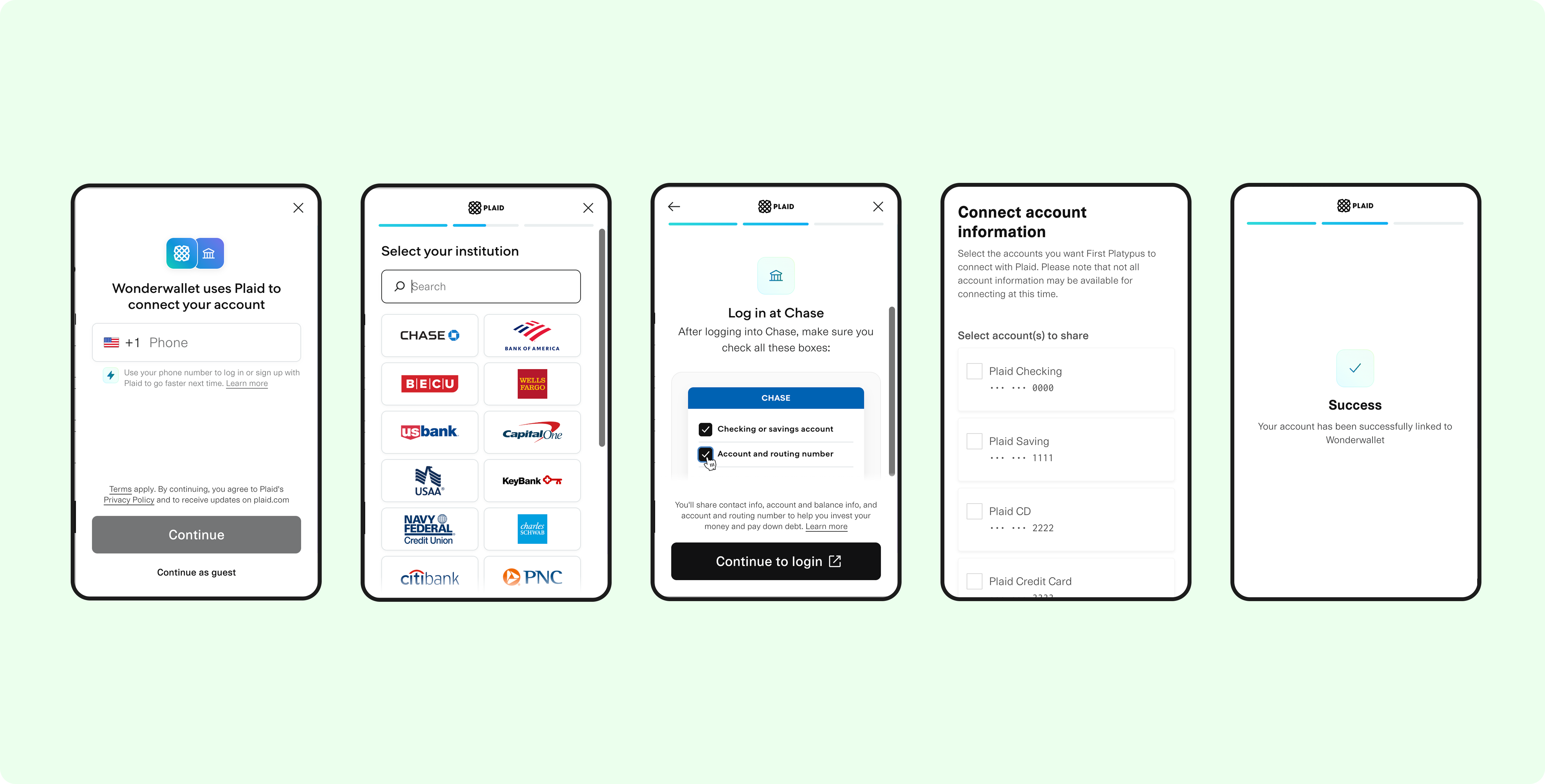
The Plaid Link UX is wrapped within the zerohash SDK, delivering a streamlined bank account verification and linking process for end customers.
Accept T's and C's
First time users will need to accept the zerohash terms and conditions.
Link a bank account
End customers verify and link their external bank accounts. On success, zerohash will create a corresponding external account and return an external_account_id to the platform which can be stored by platforms and referenced for future payment requests. Adding a bank account is a one-time process for an end customer that verifies account ownership, so it is not something a customer has to do every time they want to initiate a transaction.
There is a limit on external accounts linked to a participantThere is a default limit of three accounts linked per participant. If you need to change this, please contact your account manager.
Successful Bank Account Link
Once an end user has successfully verified and linked their external account, we’ll send you a webhook that looks like this:
{
  "request_id": "0f68333e-2114-469d-b505-c850d776e063",
  "participant_code": "CUST01",
  "platform_code": "TES123",
  "account_nickname": "",
  "status": "approved",
  "external_account_id": "0f68333e-2114-469d-b505-c850d776e063",
  "created_at": "1975-08-19T23:15:30.000Z"
}
Managing accounts linked via zerohash SDK
Platforms leveraging zerohash’s Fiat products should subscribe to webhooks to stay notified of external account updates, and can fetch external account details at any time.
Querying accounts
Platforms can fetch linked external accounts via API using the GET /payments/external_accounts endpoint.
Expired accounts
When an external account has expired, platforms will receive the following webhook:
{
  "request_id": "0f68333e-2114-469d-b505-c850d776e063",
  "participant_code": "CUST01",
  "platform_code": "TES123",
  "account_nickname": "",
  "status": "expired",
  "external_account_id": "0f68333e-2114-469d-b505-c850d776e063",
  "created_at": "1975-08-19T23:15:30.000Z"
}
Platforms can invoke the zerohash SDK for re-linking:
import React from 'react';
import ZeroHashSDK, { AppIdentifier } from 'zh-web-sdk';

const App = () => {
  const sdk = new ZeroHashSDK({
    zeroHashAppsURL: "https://web-sdk.cert.zerohash.com",
    PAYJWT: "<JWT_TOKEN_HERE>"
  });

    sdk.openModal({
    appIdentifier: FIAT_ACCOUNT_UPDATE,
  })
  return <></>;
}

export default App;
Revoked accounts
When an external account has revoked, platforms will receive the following webhook:
{
  "request_id": "0f68333e-2114-469d-b505-c850d776e063",
  "participant_code": "CUST01",
  "platform_code": "TES123",
  "account_nickname": "",
  "status": "revoked",
  "external_account_id": "0f68333e-2114-469d-b505-c850d776e063",
  "created_at": "1975-08-19T23:15:30.000Z"
}
Platforms can invoke the zerohash SDK for end customers to link a new account:
import React from 'react';
import ZeroHashSDK, { AppIdentifier } from 'zh-web-sdk';

const App = () => {
  const sdk = new ZeroHashSDK({
    zeroHashAppsURL: "https://web-sdk.cert.zerohash.com",
    PAYJWT: "<JWT_TOKEN_HERE>"
  });

    sdk.openModal({
    appIdentifier: FIAT_ACCOUNT_LINK,
  })
  return <></>;
}

export default App;
Close external accounts
POST /payments/external_accounts/{external\_account\_id}/closeThis enables removing a customer bank account so it cannot be used with zerohash any longer.
{
    "message": {
        "request_id": "0f65678e-2114-469d-b505-c850d776e078",
        "participant_code": "ABC123",
        "platform_code": "XYZ789",
        "account_nickname": "Chase",
        "account_type": "checking",
        "external_account_id": "0f68333e-2114-469d-b505-c850d776e063",
        "status": "closed",
        "created_at": 1561996924964
    }
}
Self Service Plaid Link
Self Service Plaid Link (Plaid Processor Token)
Contract with Plaid directly for the required products (Auth, Balance, Identity, and Identity Match) to link end customer bank accounts through a tokenized solution. This is also referred to as the Plaid "Processor Token" model.
Onboarding with Plaid
To kick things off:
- Set up a Plaid production or sandbox account.
- Enable zerohash as an integration in your Plaid account settings (Developers > Integrations > search for Zero Hash). Your Plaid Account Manager can assist.
If you need an intro to Plaid please contact your zerohash relationship manager, who can expedite the agreement process.
The most integral implementation lift is linking the end customer account and exchanging it for a token that is shareable with zerohash. This will require a series of Plaid calls* for a platform:
- /link/token/create
- Plaid's Auth service allows customers to sign in to their bank via the Plaid interface and authorize linking their bank account. This gives you tokenized access to the customer's bank account for debits and credits.
- Note: You can also offer manual account linking (account and routing number entry), which can take 1-2 days and requires slight changes to the Auth configuration.
- /item/public_token/exchange
- /processor/token/create
Once the processor token is created and shared with zerohash, via Create external accounts zerohash can connect the end customer bank account and initiate transactions.
*The listed calls are the minimum calls required to Plaid. To take advantage of the partnerships, you must contract for balance and identity as well, but zerohash can handle the calls.
Adding a bank account is a one-time process for an end customer that verifies account ownership, so it is not something a customer has to do every time they want to initiate an ACH transaction.
Contract Plaid
In order to use ACH or RTP via zerohash, platforms must have the following products enabled with Plaid. Auth and Identity calls are billed to platforms, but zerohash is permitted to access this data thanks to the processor token model.
| Product Name | Reason |
|---|---|
| Auth | Enables platforms to connect end customer bank accounts. |
| Balance | Enables zerohash to check current and pending bank account balances prior to executing a transaction. This check is done by zerohash for each transaction request. If the platform also chooses to do balance checks, the platform will be charged for their check, and for the check by zerohash. |
| Identity | Pulls account holder details (name, address, phone, email) directly from the end user's bank to auto-populate and verify identity data. |
| Identity Match | Compares user-provided identity info against bank-on-file data and returns match confidence scores for each field. |
Using the zerohash API
Once a Plaid onboarding has been completed, platforms can use Plaid processor tokens to link end customers’ bank accounts through the zerohash API. zerohash uses the platform supplied Plaid processor token to set up an account via Create external accounts. zerohash returns an external_account_id to the platform which can be used for later payment requests without needing to link another account. Platforms may also Get external accounts if the external_account_id is needed.
There is a limit on external accounts linked to a participantThere is a default limit of three accounts linked per participant. If you need to change this, please contact your account manager.
zerohash API Calls
Request body
| Parameter | Description | Type |
|---|---|---|
| participant_code | The code of the participant that wants to create a new ACH transaction, required. | string |
| account_nickname | Name given to the account. This does not impact further zerohash functionality so it is purely for platform reference, required. For testing only: To simulate identity checks and get a rejected account, use this content: '{"name":0, "email": 0, "address": 0}' | string |
| plaid_processor_token | Token retrieved from Plaid that enables zerohash to make API calls on the platform’s behalf, required. | string |
Additional fields in response
| Parameter | Description | Type |
|---|---|---|
| request_id | The unique identifier generated by zerohash associated with the request. | string |
| platform_code | Platform unique identifier. | string |
| external_account_id | The unique identifier generated by zerohash for the account. This must be stored and used to make subsequent payment requests. | string |
| account_type | Indicates if the account is checking or savings. | string |
| created_at | Timestamp when the account was created. | UNIX timestamp |
Create, Link, and Manage Bank Accounts via zerohash API
Platforms leveraging zerohash’s fiat products should subscribe to webhooks to stay notified of external account updates, and can fetch external account details at any time.
Create an external account
After end customers verify their bank account details through Plaid, the platform uses the returned plaid_processor_token to create an external account via API.
Querying accounts
Platforms can fetch linked external accounts via API using the GET /payments/external_accounts endpoint.
Expired accounts
When an external account has expired, platforms will receive the following webhook:
{
  "request_id": "0f68333e-2114-469d-b505-c850d776e063",
  "participant_code": "CUST01",
  "platform_code": "TES123",
  "account_nickname": "",
  "status": "expired",
  "external_account_id": "0f68333e-2114-469d-b505-c850d776e063",
  "created_at": "1975-08-19T23:15:30.000Z"
}
Platforms can re-verify end customers bank account details through Plaid and use the returned plaid_processor_token to create an external account via API.
Revoked accounts
When an external account has revoked, Platforms will receive the following webhook:
{
  "request_id": "0f68333e-2114-469d-b505-c850d776e063",
  "participant_code": "CUST01",
  "platform_code": "TES123",
  "account_nickname": "",
  "status": "revoked",
  "external_account_id": "0f68333e-2114-469d-b505-c850d776e063",
  "created_at": "1975-08-19T23:15:30.000Z"
}
Platforms can re-verify end customers bank account details through Plaid and use the returned plaid_processor_token to create an external account via API.
Close external accounts
POST /payments/external_accounts/{external\_account\_id}/closeThis enables removing a customer bank account so it cannot be used with zerohash any longer.
{
    "message": {
        "request_id": "0f65678e-2114-469d-b505-c850d776e078",
        "participant_code": "ABC123",
        "platform_code": "XYZ789",
        "account_nickname": "Chase",
        "account_type": "checking",
        "external_account_id": "0f68333e-2114-469d-b505-c850d776e063",
        "status": "closed",
        "created_at": 1561996924964
    }
}
Managing linked accounts API Workflow
Whether created via SDK with Plaid Reseller, or created directly through the zerohash API with Plaid Processor Token, external accounts can always be managed by platforms through the zerohash API.
Create external account
POST /payments/external_accounts
This API call is only relevant to platforms using Plaid Processor Token. Platforms using Plaid Reseller should invoke the zerohash SDK to link a new bank account.
Sample Request
{
    "message": {
        "participant_code": "ABC123",
        "account_nickname": "Chase",
        "plaid_processor_token": "db884a3e-7eb7-4253-92ee-04ff5efbc365"
    }
}
Sample Response
{
    "message": {
        "request_id": "0f65678e-2114-469d-b505-c850d776e078",
        "participant_code": "ABC123",
        "platform_code": "XYZ789",
        "account_nickname": "Chase",
        "account_type": "checking",
        "external_account_id": "0f68333e-2114-469d-b505-c850d776e063",
        "created_at": 1561996924964
    }
}
Close external accounts
POST /payments/external_accounts/{external\_account\_id}/close
This enables removing a customer bank account so it cannot be used with zerohash any longer.
Sample response
{
    "message": {
        "request_id": "0f65678e-2114-469d-b505-c850d776e078",
        "participant_code": "ABC123",
        "platform_code": "XYZ789",
        "account_nickname": "Chase",
        "account_type": "checking",
        "external_account_id": "0f68333e-2114-469d-b505-c850d776e063",
        "status": "closed",
        "created_at": 1561996924964
    }
}
Get external accounts
External account updates can be fetched via API, and received via external account status webhooks.
Query parameters include
page: (optional) the page you would like to request – default value is 1size: (optional) the number of records per page – default value is 200participants: (optional) array of the participants for which to filter the result
Returns an array of all accounts that have been posted for ACH transactions.
Response parameters
| Parameter | Description | Type |
|---|---|---|
| request_id | The unique identifier generated by zerohash associated with the request. | string |
| account_number | The full bank account number of the external account. Value will be empty because of the Plaid token relationship. | string |
| routing_number | The routing number of the bank where the external account is held. Value will be empty because of the Plaid token relationship. | string |
| participant_code | The code of the participant that wants to create a new ACH transaction, required. | string |
| platform_code | Platform unique identifier. | string |
| account_nickname | Name given to the account. This does not impact further zerohash functionality so it is purely for platform reference. | string |
| account_type | Indicates if the account is checking or savings. | string |
| status | Account status. Could be one of the following:pending approved rejected locked disabled closed revoked | string |
| external_account_id | The unique identifier generated by zerohash for the account. This must be stored and used to make subsequent payment requests. | string |
| created_at | Timestamp when the account was created. | timestamp |
| updated_at | Timestamp when the account was last changed. | timestamp |
Statuses
| Status | Description |
|---|---|
| pending | Account creation requested, basic validations passed, and zero hash is running identity checks. |
| approved | Identity checks passed and the account is created and ready for use. |
| rejected | Identity checks failed and the account cannot be used. |
| closed | Either the account was returned as closed when making a payment request, or the end customer actively closed their account. |
| revoked | Access to use the external account has been revoked, either by the bank or the end customer |
| locked* | zero hash risk and compliance team was alerted to suspicious activity and locked the account for further investigation. |
| disabled* | zero hash risk and compliance team investigations resulted in a positive hit of suspicious activity and the team determined that the account can no longer be used. |
Sample response
{
    "message": [
        {
            "request_id": "0f68333e-2114-469d-b505-c850d776e063",
            "account_number": "",
            "routing_number": "",
            "participant_code": "ALI123",
            "platform_code": "TES123",
            "account_nickname": "test1",
            "account_type": "checking",
            "external_account_id": "0f68333e-2114-469d-b505-c850d776e063",
            "created_at": "1975-08-19T23:15:30.000Z",
            "updated_at": "1975-08-19T23:15:30.000Z"
        }
    ],
    "page": 1,
    "total_pages": 1,
    "page_size": 200,
    "count": 10
}
Updated about 2 months ago