
How AUTH works
Follow the AUTH flow to link institutional accounts and digital asset wallets, authorize onchain transfers, and track transfer status.
How AUTH works
Let your end users select a connection, authenticate and link an account, and authorize an onchain transfer without copying wallet addresses or choosing a blockchain network.
AUTH structures onchain transfers around authenticated, end-user-permissioned accounts. End users link institutional accounts (such as an exchange) or digital asset wallets within your platform’s application through an AUTH-enabled software development kit (SDK).
Your platform chooses the transfer types, connections, assets, networks, and controls enabled with zerohash. See the AUTH network for supported institutional accounts and digital asset wallets.
Get started with AUTH to configure and test an integration.
End-user flow
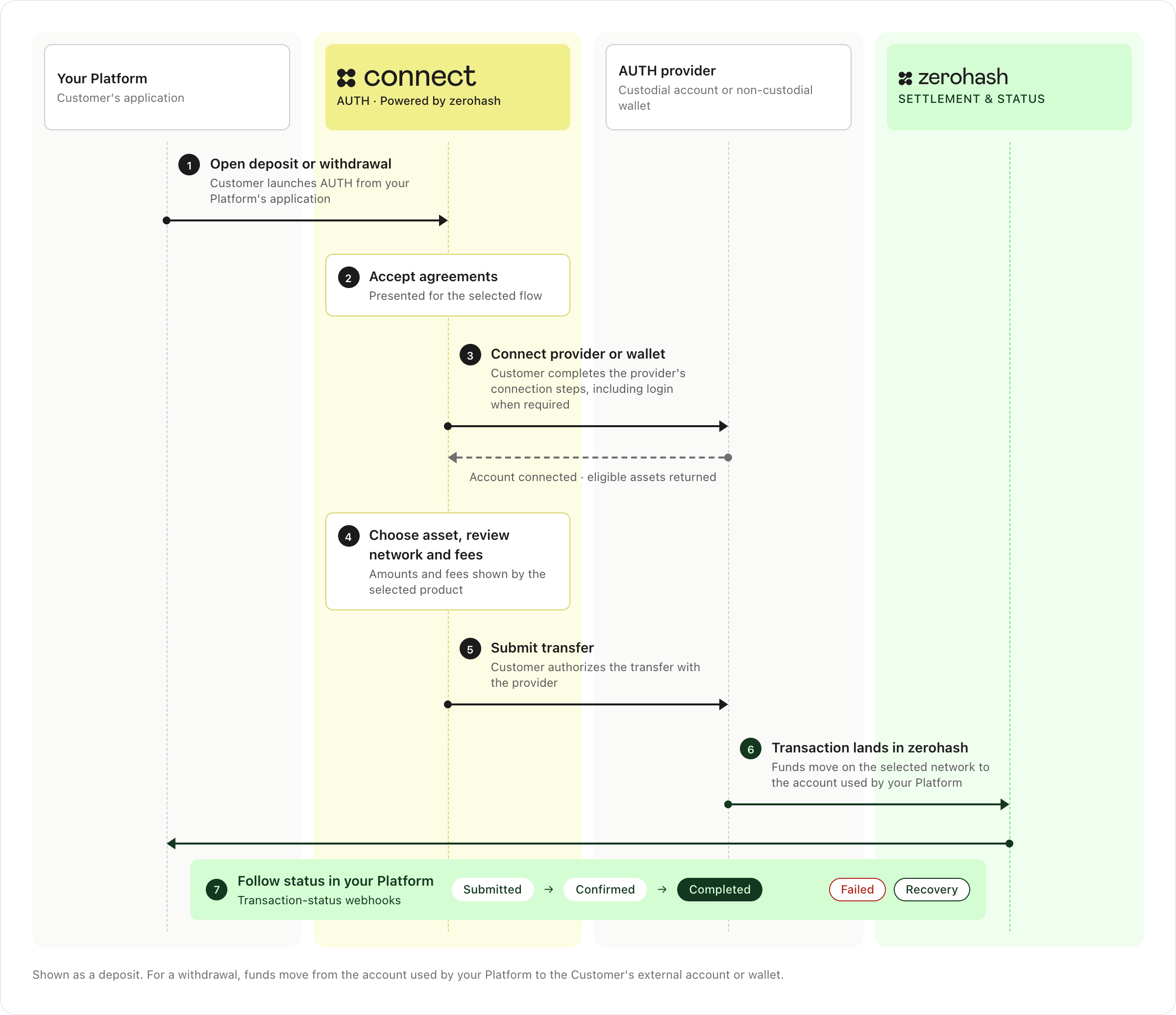
- Open the flow - Your end user opens the AUTH-enabled deposit or withdrawal experience in your platform’s application
- Accept agreements - Your end user reviews and accepts any agreements presented for the selected flow
- Select a connection - Your end user chooses an available institutional account or digital asset wallet
- Authenticate and link - Your end user completes the selected connection’s authentication steps, including multi-factor authentication when required, and grants permission to link the account
- Review and transfer - Your end user chooses a supported asset, reviews the transfer details and any amounts or fees shown, and authorizes the onchain transfer without copying a wallet address or choosing a blockchain network
- Track the outcome - Your end user follows the transfer status in your platform’s application
A submitted transfer is not necessarily completed. Integrate transaction-status webhooks to distinguish submission from confirmation, completion, failure, and recovery. Screens and steps vary by SDK and external account; test the end-user experience for your selected integration.
Deposits and withdrawals
For a deposit, the end user initiates a transfer from an external account toward the account used by your platform. For a withdrawal, the end user initiates a transfer from your platform toward a supported institutional account or digital asset wallet. The Fund Withdrawals SDK with AUTH guide covers a fiat-funded withdrawal; other withdrawal products have different funding and settlement steps.
Account types and network selection
Use the Connection control to choose which institutional accounts and digital asset wallets appear to end users.
Choose supported assets and blockchain networks with zerohash as part of AUTH configuration. AUTH removes manual chain selection from the end-user transfer experience; your platform still determines which networks to enable with zerohash. Confirm support for each provider, asset, and network combination, and test the transfer details shown in your selected SDK before rollout.
Updated 10 days ago