
Recovery SDK Integration Guide
Overview & Concepts
The Recovery SDK is a UI experience that Platforms can embed within their products to offer a self-service method of fund recovery. Funds that are processed through zerohash deposit products can periodically fail to complete transfer, and if recoverable, will be deposited into a specific sub-ledger under the customer's participant code.
The user can then log into the Recovery SDK hosted on your Platform to recover their funds to a destination of their choice.
The high-level steps of this process are:
- User authenticates to your platform using your standard authentication method (SSO, username & password, etc.)
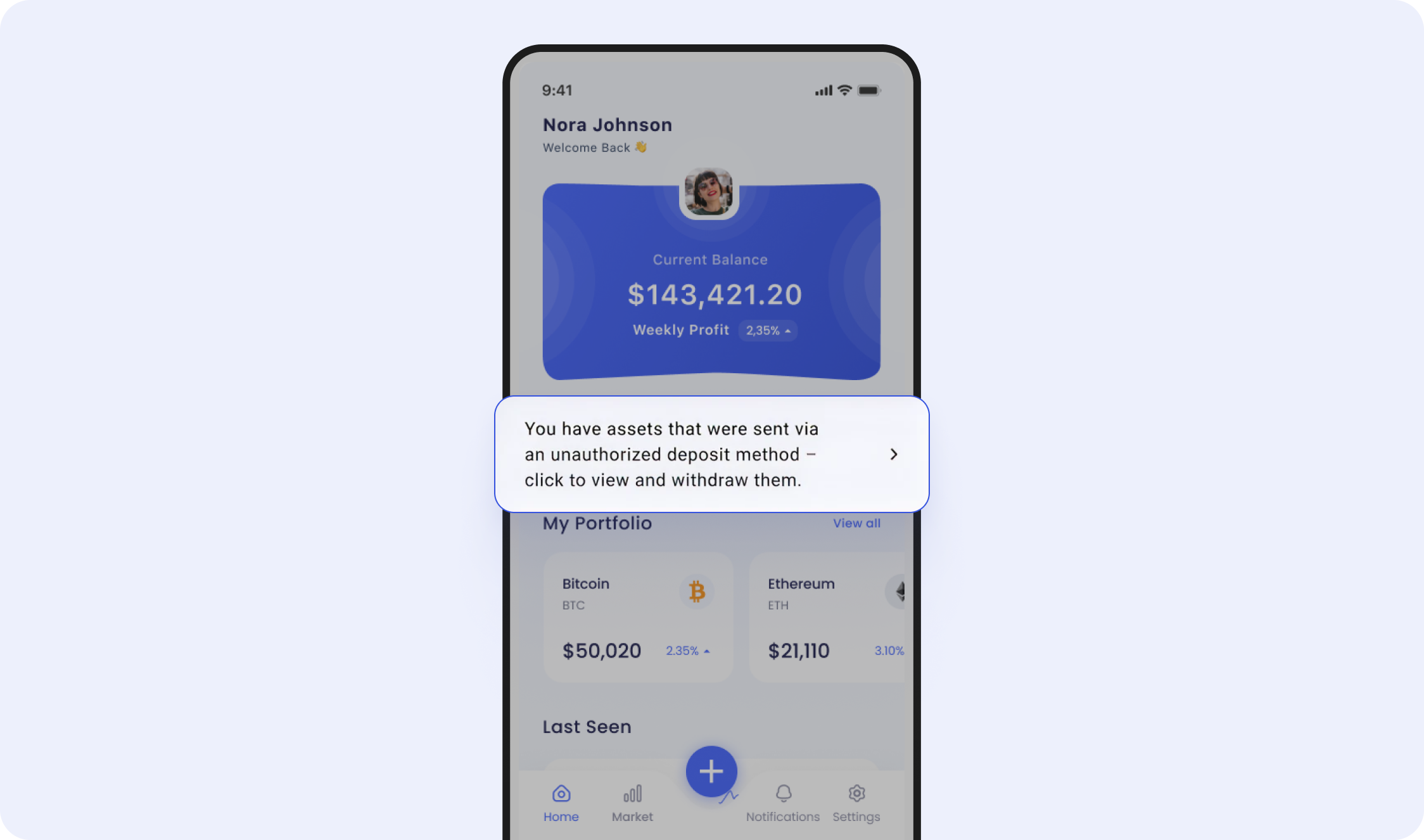
- Platform displays a notification to the user indicating that there are funds to recover. It is also recommended to send an email that explains the resolution process.
- Once the action has been taken, the Platform should invoke the Auth SDK, allowing the user to link an external exchange or wallet account and initiate a withdraw.
- User initiates withdrawal of funds - the user will sign into their custodial or non-custodial account to initiate the withdrawal. zerohash will also allow for a "Manual Transfer" withdraw method. Note: zerohash will only permit withdrawals of the same asset that they deposited - no exchanges.
Integration Steps
1. Receive deposit detected webhook
When zerohash detects that a deposit is available for recovery, we will send a deposit.status_changed webhooks with state = recovery_quarantine. Example payload:
{
  "deposit_id": "c7984d78-8d37-49c2-8388-5d2ed1933789",
  "account_id": "",
  "participant_code": "<PARTICIPANT_CODE>",
  "transaction_hash": "0x4fc2af115b94ca12a29f9378ad1aac39ee6af21be84efece560899049baa5767",
  "state": "recovery_quarantine",
  "asset": "ETH",
  "amount": "0.01",
  "source_address": "0xE40e3a093Cc6949326d639F1Ff7a051129eDBF36",
  "received_address": "0x34E40BC1d5939F919d59AE78FcB93E7274957890",
  "timestamp": 1765837019,
  "readable_timestamp_utc": "2025-12-15T22:16:59Z"
}
2. Invoke the Recovery SDK
When a user wants to recovery their funds, you can invoke the Recovery SDK by Initialize a session.
{
  "account": {
    "reference_id": "USER01" // the End User's participant_code that was created via POST /participants/customers/new within zerohash
  },
  "session": {
    "metadata": {
	// The Organization can send in any metadata that will be performed in subsequent webhook calls
    }
  },
  "scopes": [
    "user:recovery:send" // enum: "user:deposit:send" || "user:withdrawal:request" || "user:recovery:send"
  ]
}
3. User withdraws their funds
The balances will all be cumulative - if they make multiple non-auth deposits, we will combine the balances per asset and display a single line item. It will contain important data points such as blockchain transaction hash, timestamp of receipt, asset received, network received on, and amount.
From there, the user will select each transaction to resolve and withdraw out to an external wallet. The user can choose from a Custodial account, non-custodial account or can choose to transfer manually by entering their address manually.
For custodial transfers, the user will be prompted to:
- Sign into their account
- Perform 2FA
- Confirm the details of their transfer
- Perform 2FA once more
- Ultimately initiate the transfer
For non-custodial or manual transfers the user will be prompted to:
- Enter the destination address (zerohash will screen the address against our transaction monitoring deny-lists, ensuring funds are not sent to tainted addresses)
- Initiate the transfer
4. Receive transfer initiated webhook
When the transfer has been sent on-chain, zerohash will send a series of webhooks that lets the Platform understand the progress of the transfer:
submitted example - the transfer has started:
{
   "payment_details":{
      "withdrawal_request_id":"b752503c-1c42-4dfe-ad1d-7b39da5db59c",
      "trade_id":"",
      "on_chain_transaction_id":"",
      "network_fee_notional":"",
      "network_fee_quantity":"",
      "destination_address":"EPjFWdd5AufqSSqeM2qN1xzybapC8G4wEGGkZwyTDt1v"
   },
   "asset":"USDC",
   "network":"BASE",
   "payment_type":"auth_withdrawal",
   "external_account_id":"2cc93b20-ee43-4877-8cdc-863e61829015",
   "participant_code":"<PARTICIPANT_CODE>",
   "quantity":"",
   "status":"submitted",
   "created_at":"2024-09-26T13:05:22.657Z",
   "updated_at":"2024-09-26T13:05:22.657Z",
   "total":"100.00"
}
posted example - the transfer is officially pending on-chain and is on its way to the external wallet:
{
   "payment_details":{
      "withdrawal_request_id":"b752503c-1c42-4dfe-ad1d-7b39da5db59c",
      "trade_id":"",
      "on_chain_transaction_id":"FLaUcxdNxRwnaSXp6pXeRSfANXEHouqYbqF6X1bgRxg2",
      "network_fee_notional":".01",
      "network_fee_quantity":".001",
      "destination_address":"EPjFWdd5AufqSSqeM2qN1xzybapC8G4wEGGkZwyTDt1v"
   },
   "asset":"USDC",
   "network":"BASE",
   "payment_type":"auth_withdrawal",
   "external_account_id":"2cc93b20-ee43-4877-8cdc-863e61829015",
   "participant_code":"<PARTICIPANT_CODE>",
   "quantity":"",
   "status":"posted",
   "created_at":"2024-09-26T13:05:22.657Z",
   "updated_at":"2024-09-26T13:05:22.657Z",
   "total":"100.00"
}
settled example - the transfer is complete and the user has their funds:
{
   "payment_details":{
      "withdrawal_request_id":"b752503c-1c42-4dfe-ad1d-7b39da5db59c",
      "trade_id":"",
      "on_chain_transaction_id":"FLaUcxdNxRwnaSXp6pXeRSfANXEHouqYbqF6X1bgRxg2",
      "network_fee_notional":".01",
      "network_fee_quantity":".001",
      "destination_address":"EPjFWdd5AufqSSqeM2qN1xzybapC8G4wEGGkZwyTDt1v"
   },
   "asset":"USDC",
   "network":"BASE",
   "payment_type":"auth_withdrawal",
   "external_account_id":"2cc93b20-ee43-4877-8cdc-863e61829015",
   "participant_code":"<PARTICIPANT_CODE>",
   "quantity":"",
   "status":"settled",
   "created_at":"2024-09-26T13:05:22.657Z",
   "updated_at":"2024-09-26T13:05:22.657Z",
   "total":"100.00"
}
Updated 2 months ago